


Most teams don't have an information architecture. They have sediment. Layers of docs, tickets, dashboards, Slack threads, and half-finished Notion pages deposited over years, each one named by whoever happened to create it, tagged (if at all) with whatever label felt right that afternoon. Then someone asks a reasonable question — "how many active initiatives touched the billing system last quarter?" — and the honest answer is: nobody can tell you without a week of manual archaeology.
This isn't a tooling problem. Teams with the most expensive, well-integrated toolchains often have the worst sediment, because every tool invented its own vocabulary and nobody reconciled them. The problem is that the shared language for describing work was never specified. And once you try to layer analytics or automation on top of unspecified work, you inherit every inconsistency underneath.
A work information architecture taxonomy fixes the layer below the dashboards. It's the prescriptive, org-wide agreement on what artifact types exist, what metadata each one must carry, and how each one moves from draft to live to retired. Get that right and your reporting stops lying to you. Get it wrong and you'll keep buying tools to paper over a vocabulary problem.
Why the sediment forms in the first place
The instinct across almost every growing org is to let each team "own its own process." That sounds healthy — autonomy, local judgment, less bureaucracy. And at ten people it works fine, because everyone shares context by osmosis. You know that "the Q3 doc" means the roadmap doc, because there's only one.
The trouble starts when you cross the point where no single person holds the whole map in their head. Suddenly "roadmap" means a slide deck to marketing, a backlog view to engineering, and a spreadsheet to finance. None of them are wrong. They're just three different artifacts wearing the same name, and any automation or report that assumes "roadmap" means one thing quietly produces garbage.
What we've seen across a lot of operations is that the breakdown is rarely dramatic. It's drip-by-drip. A new tag gets added for one project and never retired. A team adopts a status called "In Review" that overlaps 80% with another team's "Pending." Someone exports data, joins it in a spreadsheet, discovers two "priority" fields disagree, and picks the one that supports the story they wanted to tell. Multiply that by a few years and you get an organization where the data exists but nobody trusts it, so decisions get made on vibes and the loudest voice in the room.
The deeper pattern: taxonomy debt compounds faster than technical debt, because every new artifact is created against the broken standard. Code debt sits still. Taxonomy debt actively reproduces itself every time someone opens a blank doc.
What actually breaks at scale
It's worth being specific about the failure modes, because "our data is messy" is too vague to act on. Here's where it shows up concretely:
Stop losing track of your priorities.
Workyly helps you organize, assign, and track every task efficiently.
- Centralized task management
- Real-time collaboration
- Intelligent workflow automation
No credit card required
-
Reporting that requires a human translator. Every dashboard has an asterisk that only one analyst understands. When that analyst is on vacation, the numbers go dark.
-
Automation that can't be trusted to run unattended. You wanted a rule that auto-escalates any "critical" item older than 48 hours. But "critical" is entered three different ways, so the rule misses a third of them and nobody notices until something burns.
-
Duplicate work. Two teams solve the same problem because neither could find the other's artifact. No consistent way to tag or search for it.
-
Onboarding that takes months. New hires can't navigate the work because the structure lives in people's heads, not in the metadata.
-
Audit and compliance pain. When someone asks "show me every decision that affected customer data," you can't query for it, because "decision" isn't a defined artifact type with required fields.
A typical example looks like this. A mid-sized product org, maybe 60 people across six teams, running four tools: a ticketing system, a docs platform, a dashboard tool, and a spreadsheet layer holding everything the other three couldn't. They had something like 40+ custom fields across the ticketing system alone, roughly a third of which were used on fewer than 5% of tickets. Priority was captured in two places that disagreed about 20% of the time. When leadership asked for a simple monthly view of initiatives by business area, it took an analyst about three days each month to assemble — mostly manual reconciliation. That's roughly 30+ days a year of a skilled person's time spent translating one vocabulary into another.
None of that is a people failure. Everyone was doing reasonable local work. The system never defined the shared contract.
The core idea: minimal and prescriptive, not comprehensive
The instinct when you finally decide to fix taxonomy is to build the complete model — every artifact type anyone might ever need, every field anyone might ever want. That's exactly how you end up with 40 custom fields nobody fills in.
The better approach is aggressively minimal and genuinely prescriptive. Minimal means: the smallest set of artifact types and required fields that still lets you answer your real questions. Prescriptive means these fields are required, not suggested, and there's a defined owner and lifecycle for each type. Suggested metadata is effectively no metadata — people skip anything optional when they're busy, which is always.
A useful way to decide what's required: work backward from the questions you actually need to answer and the automations you actually want to run. If no report and no automation ever reads a field, it shouldn't be required. If a field is the join key between three systems, it's non-negotiable.
A minimal artifact taxonomy that holds up
You don't need dozens of artifact types. Most orgs can run on a small handful. Here's a baseline that scales reasonably well, with the required metadata and who owns the definition:
| Artifact type | Purpose | Required meta-fields | Definition owner |
|---|---|---|---|
| Initiative | A funded body of outcome-oriented work | ID, title, business area, status, owner, target outcome, funding state | Portfolio / PMO |
| Task / Ticket | A unit of executable work | ID, parent initiative, status, priority, assignee, due/created dates | Delivery team lead |
| Decision record | A durable choice and its rationale | ID, linked initiative, status, decision owner, review date | Decision owner |
| Document / Knowledge | Reference material tied to work | ID, type, owner, freshness date, linked initiative | Doc owner |
| Metric / Signal | A measured value used for decisions | ID, definition, owner, source system, refresh cadence | Metric owner |
The key discipline isn't the table — it's that every field has a controlled vocabulary where it matters. "Status" can't be free text. "Business area" has to come from a fixed list. "Priority" has three or four defined values with written criteria, not a dropdown people interpret however they feel. The moment any of these becomes free-text, your analytics quietly degrade and your automations start missing matches.
Two artifact types above deserve emphasis because they're the ones teams most often fail to treat as first-class, structured objects. Documentation is the first — treating knowledge with real ownership and freshness rules rather than letting it rot is its own discipline, and worth reading our take on knowledge-as-work with SLA-driven documentation and ownership if that's your current weak spot. The second is decision records. When decisions are a defined artifact type with required fields and review dates, you can actually trace why things happened — we covered that in depth in decision records as operational artifacts.
Lifecycle rules: the part everyone forgets
Taxonomy without lifecycle is a filing cabinet that only gets fuller. What keeps the system clean over time is defined promotion and deprecation — explicit rules for how an artifact earns its "live" status and how it gets retired.
-
Draft — exists, not authoritative. Can have incomplete metadata. Excluded from most reporting.
-
Promotion gate — to become Active, the artifact must have all required fields populated with valid controlled values, and a named owner. This is where enforcement lives.
-
Active — authoritative, included in analytics, eligible for automation. Owner is accountable for freshness.
-
Deprecation trigger — a defined condition fires
freshness date passes, parent initiative closes, owner leaves, or a review date lapses.
-
Deprecated / Archived — removed from active reporting and automation scope, but preserved for audit. Not deleted.
The promotion gate is what prevents sediment. Nothing becomes "real" in the eyes of your reporting until it meets the contract. The deprecation trigger is what prevents the cabinet from filling forever — artifacts don't live indefinitely by default; they expire unless someone reaffirms them.
Worth calling out specifically: the most dangerous artifacts are the ones that are "active" but stale. A retired doc is honest about being retired. A decision record that's three years past its review date but still marked active is actively misleading people. Deprecation triggers exist precisely to catch that quiet drift.
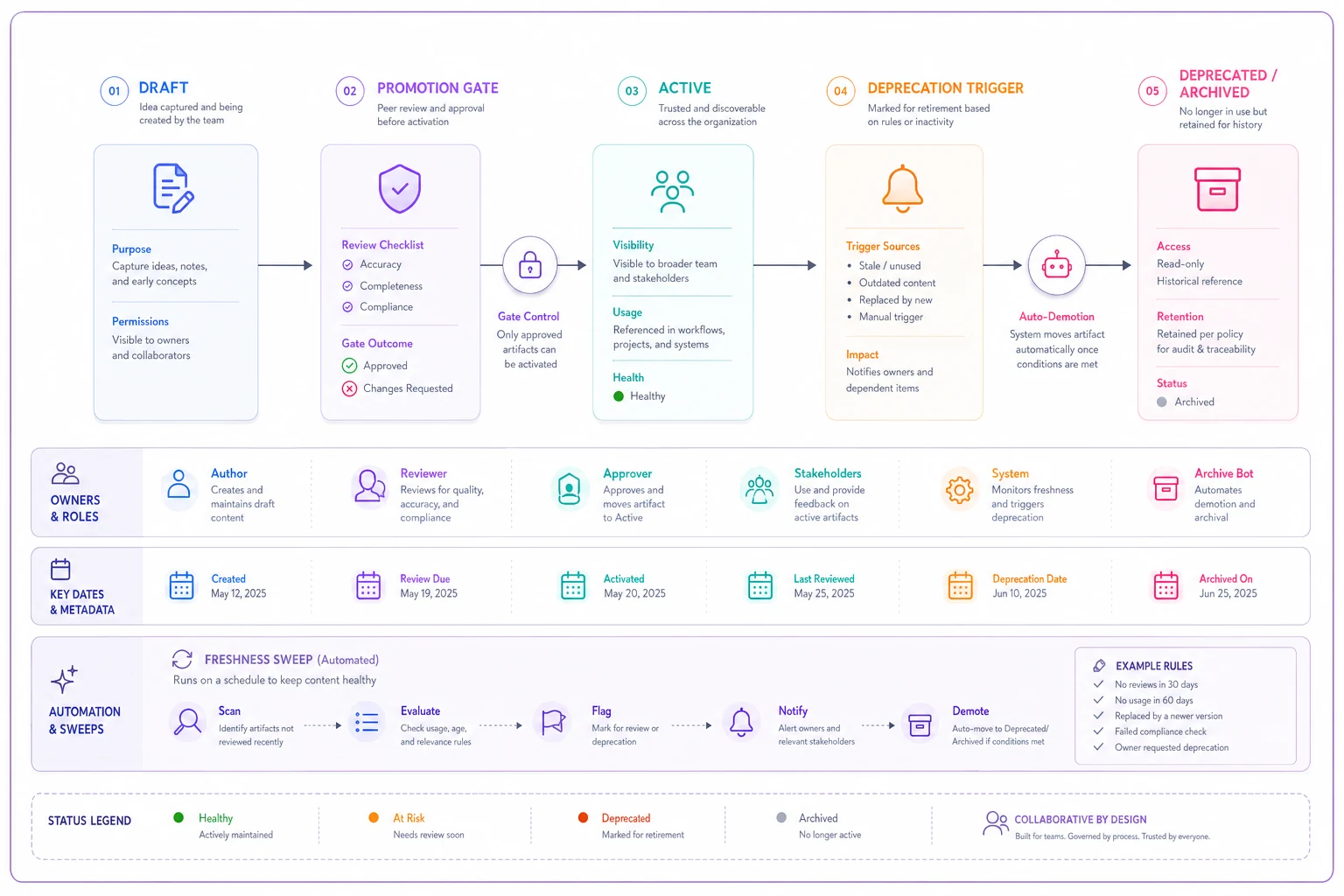
This diagram shows how artifacts move through states and where gates, owners, and scheduled reviews act.
Enforcement: templates and automation that keep the contract honest
A taxonomy that depends on everyone remembering the rules is already failing. The enforcement has to live in the workflow, not in a wiki page people read once.
-
Creation templates per artifact type. When someone creates a new initiative, the form itself requires the fields and offers only the controlled-vocabulary values. You can't create a malformed one.
-
Promotion checks. An artifact can't move to Active until required fields validate. This can be a simple automated rule that blocks the status change.
-
Freshness and review sweeps. A scheduled job flags artifacts whose freshness or review date has passed, routes them to the owner, and demotes them if ignored past a grace window.
-
Orphan detection. Any task without a valid parent initiative, or any metric with no owner, gets surfaced automatically rather than discovered by accident months later.
One honest caution: automated enforcement is powerful and easy to overdo. If your rules are too aggressive — demoting things on day one of being stale, blocking creation for trivial reasons — people route around the system entirely and you're back to sediment, now with a layer of resentment on top. Enforcement needs grace windows, clear owner notifications, and the ability to override with a reason. If you're wiring up these kinds of rules, it's worth reading through the guardrail patterns in avoiding automation missteps with short-cycle triage automation, because the failure modes there apply directly.
A quick enforcement checklist
-
Every artifact type has a creation template with required fields
-
Controlled vocabularies exist for status, priority, and business area
-
Promotion to Active is gated on valid required fields
-
Each artifact type has a named definition owner
-
Freshness/review dates exist and are swept on a schedule
-
Deprecation triggers are defined and have grace windows
-
Orphan and stale-active artifacts are surfaced automatically
-
Overrides are allowed but require a logged reason
Enforcement needs grace windows, clear owner notifications, and the ability to override with a reason.
If you're wiring up these kinds of rules, it's worth reading through the guardrail patterns in avoiding automation missteps with short-cycle triage automation, because the failure modes there apply directly.
A real scenario
An operations-heavy services company, around 45 people, had grown by acquisition and inherited three different ways of tracking work. The core pain: leadership couldn't get a reliable count of active client engagements, because "engagement" was tracked as a project in one tool, a ticket thread in another, and a spreadsheet row in a third.
They didn't buy new tooling. They defined a minimal taxonomy — five artifact types, controlled vocabularies on four fields, a promotion gate, and a monthly freshness sweep. The first sweep alone flagged something like 70 "active" items that were actually finished or abandoned. Cleaning those out dropped their reported active count by nearly a third, which turned out to be the real number all along.
The outcome that mattered wasn't a dramatic revenue swing. It was that the monthly reporting job went from roughly three days of manual reconciliation to something close to an afternoon, and — more importantly — people started trusting the numbers enough to argue about strategy instead of arguing about whose spreadsheet was right. That shift in where the arguments happen is usually the clearest sign the architecture is working.
When this is worth it — and when it isn't
When it makes sense: You've crossed the point where no one person holds the whole map. You're trying to run analytics or automation and keep hitting dirty data. You have multiple teams or tools that invented overlapping vocabularies. You're spending real human hours translating between systems every reporting cycle.
When it's a bad idea: You're under ~15 people with one tool and shared context. At that size, a prescriptive taxonomy is overhead you'll resent, and the osmosis still works. Impose this too early and you'll spend energy enforcing structure nobody needs yet.
Who should NOT do this: Anyone hoping to model everything up front. If the goal is completeness rather than answering real questions, you'll build the 40-field monster again under a new name. Start from the questions and automations you actually have, and let the taxonomy stay deliberately small until a real need forces it to grow.
Where this fits in the larger system
A work information architecture taxonomy isn't a standalone project — it's the foundation layer that makes everything above it reliable. Your dashboards are only as honest as the controlled vocabularies underneath them. Your automations only run unattended when the metadata they read is guaranteed clean. Your decision history is only traceable when decisions are a structured artifact type with required fields.
Resist the urge to boil the ocean. Define the smallest set of artifact types and required fields that answers your actual questions. Make the required fields genuinely required through templates and promotion gates. Give every artifact a lifecycle so the cabinet empties as well as fills. Then let the analytics and automation sit on top of something stable — which is the whole point, because clean structure is the difference between a system that answers questions and a pile of documents that just accumulates.
Resist the urge to boil the ocean. Define the smallest set of artifact types and required fields that answers your actual questions. Make the required fields genuinely required through templates and promotion gates. Give every artifact a lifecycle so the cabinet empties as well as fills. Then let the analytics and automation sit on top of something stable — which is the whole point, because clean structure is the difference between a system that answers questions and a pile of documents that just accumulates.
Ready to boost your team's productivity?
Join 5,000+ teams using Workyly to streamline workflows, improve communication, and deliver projects faster.