


Most teams don't have a "too few processes" problem. They have a "nobody remembers why we still do this" problem. The weekly export emailed to someone who left eighteen months ago. The three-step approval on purchases under $200. The status doc updated religiously that nobody opens.
These aren't dramatic failures. They're small drags that compound. And the reason they survive is boring: retiring a process feels riskier than keeping it. So everything accumulates, and the operational floor slowly rises until onboarding a new hire takes three weeks because there are forty micro-rituals nobody can explain.
This is a tight, practical process audit checklist built around three numbers — value, cost, and risk — feeding a decision matrix (keep / adapt / retire) and a 30-day verification window so you don't just delete things and pray.
Why process debt is harder to kill than technical debt
Code debt at least announces itself. Something breaks, a page loads slow, an error rate climbs. Process debt is quieter. It hides inside habits and calendars, defended by the most dangerous phrase in operations: "we've always done it this way."
There's a specific reason legacy processes resist removal. When a process gets created, someone attaches their credibility to it. Retiring it feels like admitting the original decision was wrong — even when the context that justified it disappeared years ago. So the process outlives its purpose because no one wants to own that call.
The other problem is that the cost is distributed and the benefit is concentrated. A pointless approval step costs everyone twenty minutes a week but protects one manager's sense of control. Diffuse pain, concentrated comfort. That asymmetry is exactly why process debt needs a scoring mechanism rather than a meeting. You want the decision to come from the numbers, not from whoever argues loudest.
The one-page audit: three scores, nothing more
Keep this deliberately small. The moment an audit needs its own project plan, it dies. Every process gets scored on three axes, each 1–5.
Stop losing track of your priorities.
Workyly helps you organize, assign, and track every task efficiently.
- Centralized task management
- Real-time collaboration
- Intelligent workflow automation
No credit card required
Value (1–5): How much does this process actually move an outcome someone cares about? Not "is it nice to have" — does removing it cause a real, traceable problem?
Cost (1–5): Total drag. Time spent, tools maintained, handoffs created, cognitive load. A "5" means it eats serious hours or actively blocks people from doing real work.
Risk (1–5): What breaks if you change or remove it? Compliance exposure, customer impact, dependencies you can't see. A "5" means changing it is genuinely dangerous.
The nuance most audits miss: risk cuts both ways. High risk isn't automatically a reason to keep something. Sometimes the highest-risk processes are the ones most in need of adapting — because "risky and manual" is exactly the combination that eventually causes an incident. Risk tells you how carefully to move, not whether to move.
A quick way to capture it on one line per process:
| Process | Value | Cost | Risk | Score note |
|---|---|---|---|---|
| Weekly manual sales export | 2 | 4 | 1 | Low value, high drag, safe to touch |
| Client contract sign-off | 5 | 3 | 5 | Real value, real risk — adapt carefully |
| Duplicate QA checklist step | 1 | 2 | 1 | Nobody uses the output |
| Monthly compliance report | 4 | 3 | 5 | Keep, but tighten |
The whole audit should fit on a single page. If you're scoring forty processes, that's forty rows. Resist the urge to add columns.
The decision matrix: turning three numbers into one verb
Scores are useless without a rule that converts them into action. This matrix holds up across very different teams — a marketing agency, a 12-person manufacturing office, a SaaS support org all landed on essentially the same thresholds.
-
RETIRE — Value ≤ 2 and Risk ≤ 2, regardless of cost. Low value, safe to remove. These are your fastest wins. The weekly export nobody reads lives here.
-
ADAPT — High Cost (4–5) but Value ≥ 3, or anything with Risk ≥ 4 that also has real cost. The process matters, but the current form of it doesn't. This is where automation, simplification, or consolidation belongs. Most of your effort should land here.
-
KEEP — Value ≥ 4 and Cost ≤ 3. It works, it's cheap, leave it alone. The discipline here is doing nothing — teams love to "improve" things that are already fine.
The trap: treating everything ambiguous as "adapt." Adapt is the seductive middle answer because it feels safe and productive. But an adapt pile of thirty items is just a backlog you'll never finish. A useful audit is aggressive about retiring. If you finish and haven't retired anything, you didn't audit — you inventoried.
One pattern worth naming: the zombie adapt. A process scores as "adapt," someone half-fixes it, and it lingers in a worse state than before — partly manual, partly automated, fully confusing. If you can't commit to actually adapting it this quarter, retire it or keep it as-is. Half-adapting is the worst outcome.
A real scenario: the accounting firm's phantom reconciliation
A small accounting firm — around 15 staff — ran a mid-month "pre-reconciliation" for client books. It existed because, years earlier, one large client needed early numbers before a board meeting. That client had since churned. The process hadn't.
On the audit it scored Value 2, Cost 4, Risk 1. Two staff spent roughly six to eight hours combined every month producing a report that went into a folder nobody opened. Straight into RETIRE.
But instead of just killing it, they ran the 30-day verification window. During that period, one associate flagged that a piece of the pre-recon — a duplicate-entry check — was actually catching real errors. So the parent process retired and the one useful component got folded into the normal month-end close. Net result: close to a full day of recovered work per month and better error-catching. That's the whole point — retiring the wrapper while rescuing what mattered inside it.
If they'd deleted it blindly, they'd have lost the duplicate check and probably reinstated the entire bloated process after the first missed error. The verification step is what made retirement safe.
The 30-day verification plan
Retiring a process on paper and retiring it in reality are different things. People have muscle memory. Downstream dependencies are invisible until they scream. So every retire/adapt decision gets a 30-day observation window before it's final.
-
Day 0 — Announce and instrument. Tell everyone touched by the process what's changing and what to watch for. Name one owner. Define the single signal that would mean "we were wrong" — a missed report, an angry client, a broken handoff.
-
Days 1–7 — Silent pause (for retires). Don't delete anything yet. Just stop doing it and see if anyone notices. This is the cheapest test in operations. If a report stops and no one asks for it in a week, you have your answer. If three people ask on day two, you learned something valuable, cheaply.
-
Days 8–21 — Watch the downstream. Most hidden dependencies surface here, not in week one. A monthly cycle, a client check-in, a quarter-close prep — these reveal whether your "dead" process was quietly feeding something alive.
-
Day 22–29 — Decide to finalize or roll back. If the signal stayed quiet, finalize: delete the doc, remove the calendar hold, kill the automation, update the runbook. If the signal fired, either restore or move the item to "adapt" with what you learned.
-
Day 30 — Write the one-line verdict. "Retired X. No downstream impact. Recovered ~6 hrs/month." This record is what stops the process from silently reappearing eight months later.
A useful checklist to run each verification through:
-
[ ] Single named owner assigned
-
[ ] The "we were wrong" signal defined before the change
-
[ ] Silent pause used instead of immediate deletion
-
[ ] At least one full monthly cycle observed for anything cyclical
-
[ ] Downstream consumers explicitly notified
-
[ ] Final verdict written in one line and stored where people look
This is the same follow-through discipline that makes retros actually stick — capturing a decision, assigning it, and verifying it landed rather than assuming it did. If your team struggles with that last mile, the mechanics in a retrospective-to-action system that guarantees follow-through map cleanly onto process retirement too.
Use the silent pause instead of immediate deletion to cheaply validate assumptions.
A simple diagram helps visualize the 30-day verification flow.
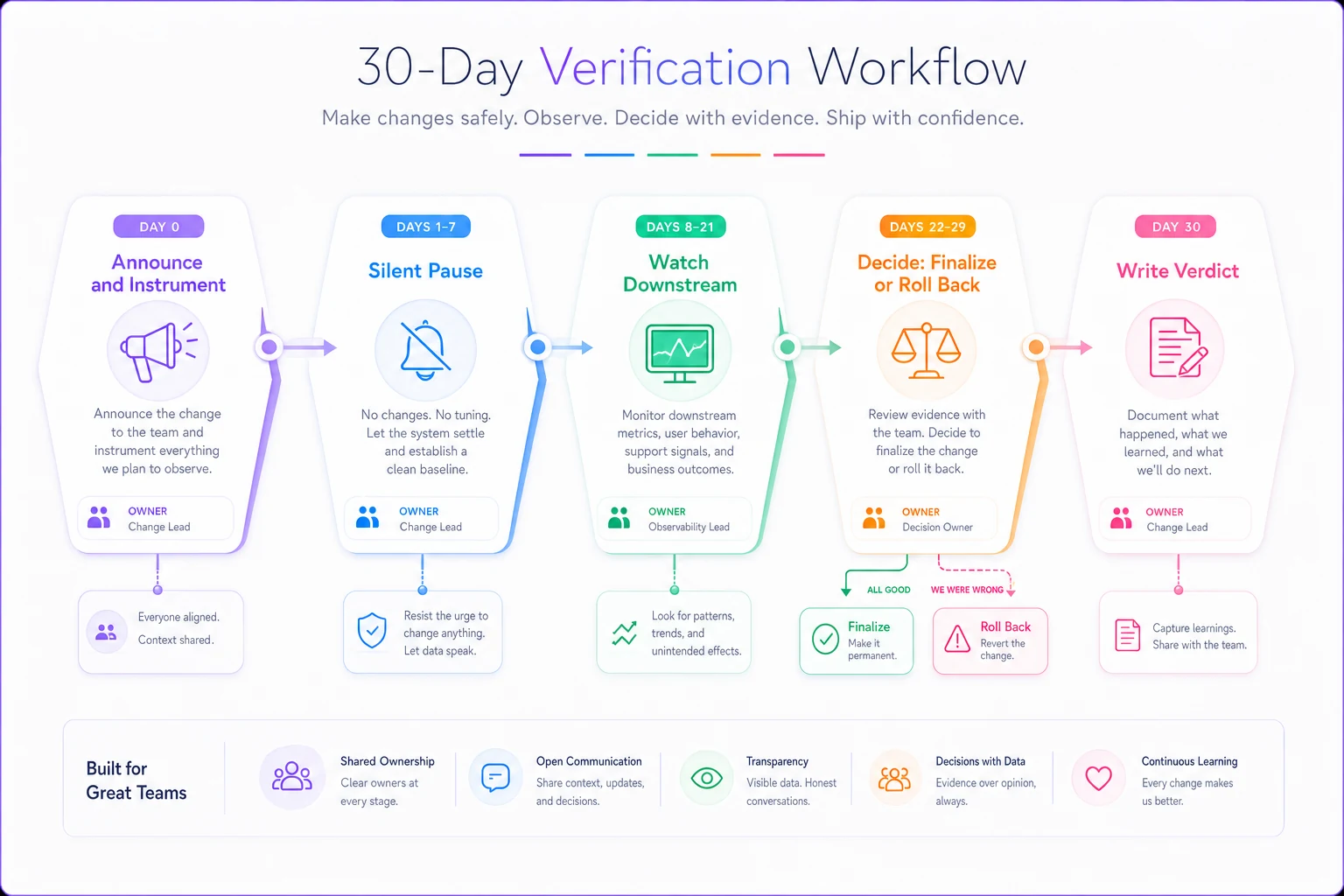
A useful checklist to run each verification through ensures the change doesn't quietly reappear and that someone is accountable for the outcome.
When this audit makes sense — and when it doesn't
When it makes sense: After a growth spurt, a merger, a tooling migration, or any period where processes got layered on faster than anyone cleaned up. Also useful before onboarding a wave of new hires — every retired process is one less thing to explain.
When it's a bad idea: In the middle of an actual crisis or audit season. Don't retire processes while regulators or a big client are watching. The risk score exists for a reason; during high-scrutiny periods, "carefully" means "not right now."
Who should NOT run this: One person acting alone. Process debt is cross-functional by nature, and the person who feels a process is useless is often not the person who depends on its output. You need at least the owner and one downstream consumer at the table for each contested item. Solo audits produce confident, wrong retirements.
Keeping the audit from becoming its own process debt
The irony writes itself: teams create an elaborate quarterly audit ritual to fight process debt, and within a year the audit is the bloated legacy process nobody questions. Keep it lean. One page, three scores, one matrix, a 30-day window. If it takes longer than an afternoon to score your list, the list is too granular — you're auditing tasks, not processes.
For the actual removal work — especially adapting older workflows that have accumulated cruft — the same pruning logic from a backlog remediation sprint applies. Timebox it, use clear decision rules, and accept that "good enough and gone" beats "perfect and still on the list."
Where lightweight operational software helps here is quiet and unglamorous: keeping the audit sheet, the owners, and the 30-day timers in one place so verifications don't quietly slip. The failure mode isn't scoring — most teams score fine in one sitting. It's that day-22 finalization gets skipped, the process limps back, and the whole exercise resets. Whatever tool holds your work, the requirement is the same: every retire/adapt decision needs an owner and a deadline attached, or it doesn't count.
The real goal isn't fewer processes
It's a team that can explain every process it runs. When you can point at any recurring ritual and say who owns it, what it's worth, and when you last checked it still matters — that's the actual win. The score-and-verify loop isn't about deletion for its own sake. It's about making "why do we still do this?" a question with an answer instead of a shrug.
Run the audit once, retire two or three obvious things safely, and the team learns the most valuable lesson: stopping something is reversible, cheap to test, and usually far less risky than it feels. After that, process debt stops accumulating as fast — because someone finally has permission to ask.
It's a team that can explain every process it runs. When you can point at any recurring ritual and say who owns it, what it's worth, and when you last checked it still matters — that's the actual win. The score-and-verify loop isn't about deletion for its own sake. It's about making "why do we still do this?" a question with an answer instead of a shrug.
Run the audit once, retire two or three obvious things safely, and the team learns the most valuable lesson: stopping something is reversible, cheap to test, and usually far less risky than it feels. After that, process debt stops accumulating as fast — because someone finally has permission to ask.
Ready to boost your team's productivity?
Join 5,000+ teams using Workyly to streamline workflows, improve communication, and deliver projects faster.