

Feature releases fail for predictable reasons. Missing documentation. Untested edge cases. Database migrations nobody reviewed. Performance tests that got skipped because "we're just adding a button." The same preventable issues, release after release.
Most teams know they need better release checks. So they build elaborate processes with twenty-seven approval gates and three-week review cycles. Then those processes get so painful that engineers find workarounds, product managers push for exceptions, and you're back to shipping broken features.
The fix isn't more process. It's a single-page feature acceptance checklist that captures exactly what matters, paired with a 48-hour sanity check rhythm that catches issues without blocking progress.
Why release checks fail even when teams try to be careful
Release problems follow patterns. A backend change breaks the mobile app because nobody checked the API contract. A new feature crashes under moderate load because performance testing got deprioritized. Documentation exists somewhere in Confluence but customer success can't find it when users start asking questions.
These aren't random failures. They happen when teams treat release readiness as a feeling instead of a checklist. "Does this feel ready?" becomes the de facto standard. Engineers think their part is done. QA tested the happy path. Product signed off on functionality. Everyone assumes someone else checked the details that matter.
The bigger issue: teams often catch problems but have no clear handback rules. QA finds a critical bug two days before release. What happens next? Does the release get delayed? Who makes that call? Without explicit criteria, you end up in emergency meetings debating whether to ship with known issues.
Traditional release management tries to solve this with heavyweight processes. Change advisory boards. Release committees. Multi-stage approval workflows. These treat every release like a space shuttle launch when most releases are closer to publishing a blog post. The overhead becomes painful enough that teams start bypassing the process entirely.
Building your one-page feature acceptance checklist
A working checklist fits on one page and covers five core areas: technical artifacts, test coverage, operational readiness, documentation, and rollback capability. Each area needs specific, binary checks—not vague requirements open to interpretation.
Stop losing track of your priorities.
Workyly helps you organize, assign, and track every task efficiently.
- Centralized task management
- Real-time collaboration
- Intelligent workflow automation
No credit card required
Technical Artifacts Section
Start with the non-negotiables. Database migration scripts reviewed and tested on staging. API documentation updated with new endpoints. Feature flags configured for gradual rollout. Performance benchmarks showing response times under expected load. Security review completed for any authentication or data handling changes.
Skip the bureaucracy. You don't need seventeen documents. You need proof that someone checked whether this change will break production. A screenshot of a successful migration on staging beats a twenty-page migration plan nobody reads.
Test Coverage Requirements
Define exactly what "tested" means. Unit test coverage above your team's threshold (usually 70-80% for new code). Integration tests covering critical user flows. Edge case scenarios documented and verified. Load testing completed if touching performance-sensitive areas. Mobile app tested if API changes affect client compatibility.
Include sample test cases right in the checklist. Not lengthy test plans—just five to ten scenarios that prove the feature works. "User can complete checkout with an expired coupon code." "System handles 500 concurrent uploads without degradation." "Feature degrades gracefully when third-party service is down."
Operational Readiness Checks
This catches the problems that surface at 2 AM. Monitoring configured for new endpoints. Alerts set up for error conditions. Runbooks updated for the support team. Database indexes created for new queries. Resource scaling verified for expected traffic.
| Area | Checklist items |
|---|---|
| technical artifacts | Database migration scripts reviewed and tested on staging. API documentation updated with new endpoints. Feature flags configured for gradual rollout. Performance benchmarks showing response times under expected load. Security review completed for any authentication or data handling changes. |
| test coverage | Unit test coverage above your team's threshold (usually 70-80% for new code). Integration tests covering critical user flows. Edge case scenarios documented and verified. Load testing completed if touching performance-sensitive areas. Mobile app tested if API changes affect client compatibility. |
| operational readiness | Monitoring configured for new endpoints. Alerts set up for error conditions. Runbooks updated for the support team. Database indexes created for new queries. Resource scaling verified for expected traffic. |
| documentation | Include sample test cases right in the checklist. Not lengthy test plans—just five to ten scenarios that prove the feature works. |
| rollback capability | Feature flags configured for gradual rollout. Verify rollback procedures are ready as part of operational readiness and release checks. |
Most teams skip operational readiness until something breaks in production. Each item takes minutes to verify but saves hours of firefighting later.
The 48-hour sanity check cadence that actually works
Two days before any release, run your sanity checks. Not a week before—too much changes. Not the day before—too late to fix real problems. Forty-eight hours gives you a meaningful checkpoint with enough time to actually react.
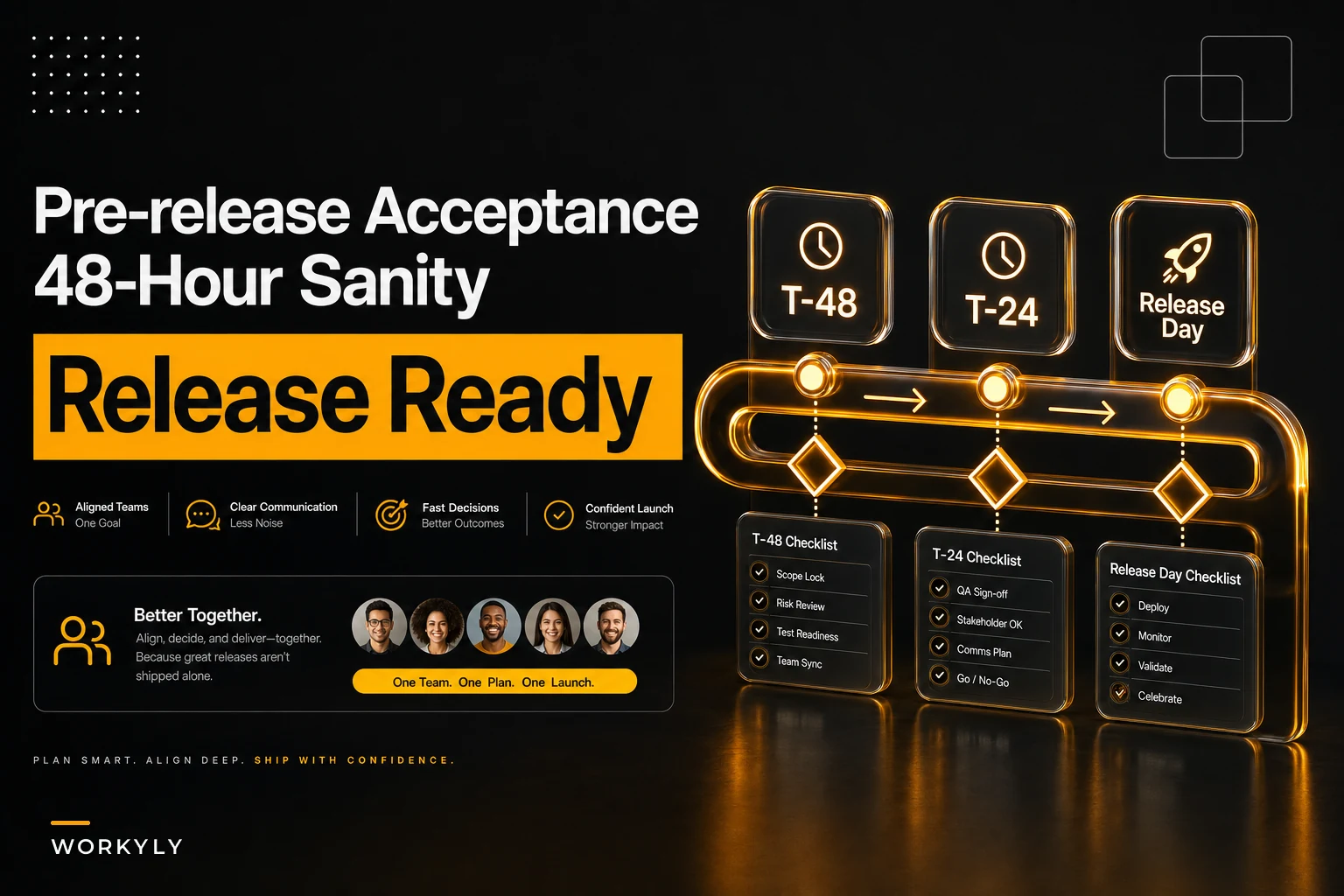
Day T-48: Initial Sanity Check
Pull the release candidate to staging. Run your smoke tests—the twenty-minute suite that verifies core functionality. Check resource consumption under realistic load. Verify feature flags work correctly. Review monitoring dashboards for anything concerning.
This isn't comprehensive testing. QA already did that. This is asking "does this release candidate look healthy?" It takes about an hour and catches obvious problems before they become emergencies.
-
Build version checked
-
Test results (pass/fail count)
-
Performance metrics vs. baseline
-
Open issues discovered
-
Go/no-go recommendation
Day T-24: Final Verification
One day before release, do your final checks. Confirm all acceptance checklist items are complete. Verify fixes for any issues found at T-48. Run critical path tests one more time. Check that rollback procedures are ready.
The key here: this isn't for discovering new problems. It's confirming that known issues got addressed. If you're still finding surprises at T-24, your earlier processes need work.
Release Day: Pre-flight Confirmation
Morning of release, do a five-minute pre-flight. Is staging still healthy? Any overnight alerts? Any new customer issues that might conflict? Anyone unexpectedly out? This isn't testing—it's making sure the conditions for a safe release still exist.
Here's a visual representation of the 48-hour sanity check workflow.
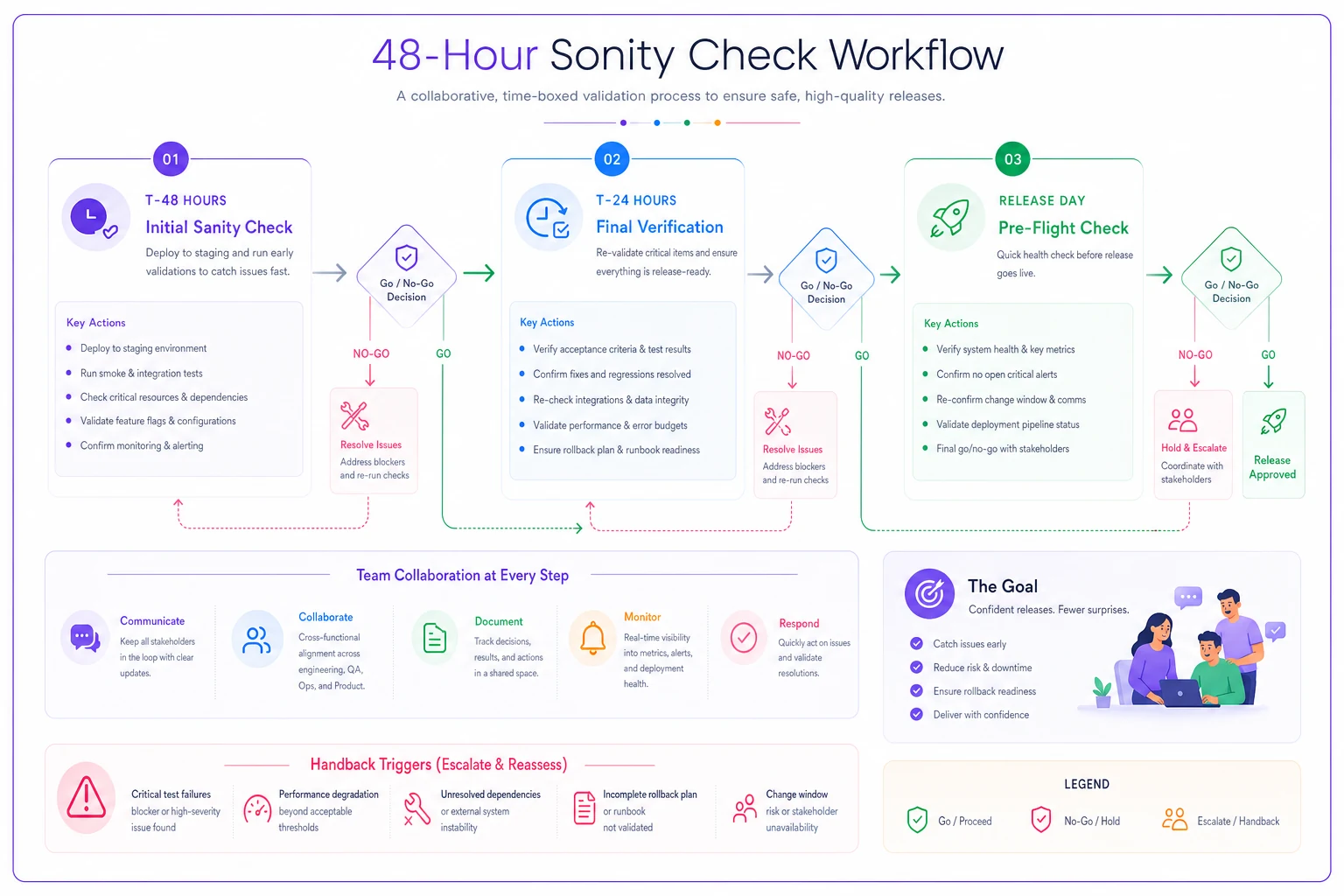
Some teams automate these checks into a release dashboard. Green lights across the board means ship it. Any red lights trigger the handback protocol.
Clear handback rules that eliminate release day drama
Handback conditions need to be explicit, agreed upon before anyone writes code, and triggered based on specific criteria—not judgment calls made under pressure.
Critical Handback Triggers
-
Security vulnerability discovered (any severity)
-
Data loss or corruption bug
-
Performance degradation over 25% on key metrics
-
Crash affecting over 10% of users
-
Integration failure with a critical third-party service
-
Missing legal or compliance requirements
No meetings. No debates. Hit one of these triggers and the release moves to the next cycle while the team fixes the issue.
Conditional Handback Triggers
-
Three or more P2 bugs discovered in final testing
-
Documentation incomplete for major features
-
Performance degradation between 10-25%
-
Non-critical third-party integration issues
-
Missing translations for supported languages
For conditional triggers, the product owner and tech lead make a joint call within two hours. Default to handback if they can't agree. This prevents endless debate while maintaining some flexibility.
The Handback Process
-
Engineering lead notifies stakeholders within 30 minutes
-
Team documents specific issues causing handback
-
Product owner adjusts release communications
-
Team creates fix plan with effort estimates
-
Next release date confirmed within 4 hours
No blame. No deep dive into "how this happened." Just acknowledge the issue, fix it, and move on. Post-mortems can happen after the release ships successfully.
Making the checklist work with your existing tools
A feature acceptance checklist only works if teams actually use it. That means integrating with existing workflows, not layering new ones on top.
For Jira/Azure DevOps Teams
Create a release template with checklist items as subtasks. Each item gets assigned to the responsible person. The release ticket can't close until all subtasks are complete. Acceptance criteria become part of your definition of done.
Link test cases directly to checklist items. Your test management tool probably already supports this. QA marks test execution right in the ticket. No separate spreadsheets to maintain.
For GitHub/GitLab Teams
Use pull request templates that include checklist items. Can't merge to the release branch without checking the boxes. Automated checks verify some items—like test coverage and build success. Manual items require explicit confirmation.
Set up status checks that block deployment if checklist items fail. Your CI/CD pipeline becomes the enforcer. No arguing about whether something is "ready enough."
For Smaller Teams
Keep it simple. A shared document with checkboxes. Update it during daily standups in release week. Review status in Slack each morning. The format matters less than consistency.
The mistake smaller teams make: over-engineering the checklist process before proving it works. Start with a simple document. Run it manually for three releases. Then automate the parts that prove valuable.
Start with the manual checklist for three releases and only automate the items that consistently provide value.
The mistake smaller teams make: over-engineering the checklist process before proving it works. Start with a simple document. Run it manually for three releases. Then automate the parts that prove valuable.
Real patterns from teams using acceptance checklists
A 40-person product team at a logistics platform kept getting customer-reported bugs after every release. Features worked perfectly in testing but failed with real customer data. Their QA process was solid. Code reviews were thorough. But they kept missing edge cases that only appeared in production.
They added a one-page checklist with a hard requirement on data validation—every feature now runs against production-like data samples. It adds roughly two hours per release. Customer-reported bugs dropped by around 70% over four months.
The unexpected benefit: releases actually got faster. Clear acceptance criteria eliminated the "is this ready?" debates that used to eat up hours. Engineers knew exactly what to deliver. QA knew exactly what to verify. Product knew exactly when to approve.
Another pattern worth noting: the 48-hour check catches issues that traditional testing misses. A payments company found their new feature worked perfectly in isolation but failed when combined with an existing feature flag configuration. Not exactly a bug—more like an unexpected interaction. The T-48 sanity check caught it because they tested the actual release candidate, not the feature in isolation.
When acceptance checklists become counterproductive
Some teams shouldn't use structured acceptance checklists. If you ship multiple times per day, the overhead isn't worth it. If you're pre-product-market fit and iterating rapidly, formal release processes slow you down. If your entire engineering team fits in one room, verbal confirmation might honestly be enough.
The checklist also fails when teams treat it as paperwork instead of protection. Checking boxes without doing the work. Rubber-stamping approvals to meet deadlines. Adding items for political reasons rather than actual risk reduction.
Watch for checklist bloat. Teams start with ten items. Six months later they have forty because every incident generated a new addition. Now the checklist takes longer than the development work itself. Prune aggressively. If an item hasn't caught a real issue in three months, cut it.
Building your first acceptance checklist this week
Start minimal. Pick your next feature release. Create a one-page checklist with five to ten items that would have caught your last production issue. Run through it manually. Takes thirty minutes.
For your first 48-hour check, keep it simple. Deploy to staging. Run basic smoke tests. Check resource usage. Note any issues. Don't try to be comprehensive—just prove the rhythm works.
Define three handback triggers. Write them down. Share with the team. Next time one happens, follow the handback process even if it feels excessive. You're building the muscle memory.
After three releases, you'll know what's missing. The checklist grows naturally based on actual problems, not theoretical risks. The 48-hour cadence becomes routine. Handback decisions happen without drama.
The difference operational software makes for release management
Managing release checklists manually works up to a point. As teams grow and release frequency increases, tracking acceptance criteria across multiple features gets messy fast. Someone forgets to update the spreadsheet. The wiki page has three different versions. Nobody knows which checklist is current.
This is where AI-powered operational software changes the dynamic for release management. Instead of maintaining separate documents, your acceptance criteria live directly in your workflow tool. The system tracks completion automatically, reminds owners of pending items, and can block releases when critical checks haven't been satisfied.
The more interesting benefit is pattern recognition over time. AI automation can analyze your release history to identify which checklist items actually prevent failures—and which ones are just noise. Maybe performance testing catches real issues regularly while documentation review rarely does. The system learns those patterns and surfaces checklist optimizations based on actual impact rather than gut feeling.
For distributed teams especially, operational software centralizes the entire release process. The feature acceptance checklist becomes a living document that updates as work progresses. Test results flow in from your CI/CD pipeline. Monitoring alerts integrate directly. The 48-hour sanity check runs on schedule with automatic notifications if anything looks off.
The handback decision that used to require emergency meetings becomes automated based on your defined triggers. The system detects a critical issue, notifies stakeholders, documents the problem, and adjusts the release date. No confusion about who makes the call or what happens next.
Similar to how teams handle delivery risk scoring, release acceptance becomes systematic rather than subjective. And just like customer request triage, clear criteria and automated workflows remove the guesswork from go/no-go decisions.
Moving from reactive to predictable releases
Failed releases aren't inevitable. They're predictable failures that happen when teams rely on informal processes and subjective judgment instead of systematic verification.
Your one-page feature acceptance checklist doesn't need to be perfect. It needs to exist, be used consistently, and evolve based on actual problems. The 48-hour sanity check doesn't need to catch everything. It needs to catch the obvious problems before they become emergencies. Handback rules don't need to cover every scenario. They need to eliminate debate when clear problems exist.
Start with one release. One checklist. One sanity check. See what breaks, what works, what wastes time. Build from there. Within a few months, you'll have a release process that catches real issues without crushing velocity.
The goal isn't perfection. It's predictability. When releases become predictable, teams can focus on building features instead of fighting fires. When acceptance criteria are explicit, everyone knows what "done" means. When handback rules are clear, difficult decisions become simple protocols.
That's when shipping software stops feeling like gambling and starts feeling like an operation.
Ready to boost your team's productivity?
Join 5,000+ teams using Workyly to streamline workflows, improve communication, and deliver projects faster.