


Most teams don't argue about whether a bug matters. They argue about whether it matters right now, before this release ships. That's a different question, and it's the one that keeps people stuck in a conference room at 6 PM debating a single Jira ticket while the release window quietly closes.
The problem isn't that teams lack opinions. It's that two reasonable engineers can look at the same bug and reach opposite conclusions because they're weighting different things. One is thinking about how many users hit it. The other is thinking about how ugly the failure looks. Neither is wrong, and neither has a shared rule to settle it. So the loudest person wins, or the person with the most political capital, or whoever's most tired.
A bug vs release scorecard fixes this by forcing both dimensions — urgency and impact — into numbers, then mapping those numbers to one of three release decisions: ship it, hold the specific change, or freeze the whole release. This post covers how to build that scorecard, the freeze rules that go with it, and the verification step that stops the same bug from quietly reopening three releases later.
Why release-blocking decisions go sideways
The core confusion is that "severity" and "release urgency" get collapsed into one word. A bug can be severe and still not block a release. A bug can be cosmetic and absolutely block a release if it's sitting on the checkout button.
Consider a payments team that finds a bug where refunds over $500 round incorrectly by a few cents. Severe? Financially, yes. But it affects maybe four transactions a week, it's logged, and finance can reconcile manually for a sprint. Meanwhile a tooltip on the signup form renders as raw HTML — cosmetic by any technical measure — but it's the first thing every new user sees. Which one blocks the release?
If your team can't answer that in under a minute, you don't have a scoring problem. You have a missing-axis problem. You're trying to rank on one number — how bad is it — when the decision actually lives on two: how bad is it, and how exposed are customers to it in this release window.
The second reason these calls go sideways is timing pressure contaminating the judgment. When the release is already late, bugs get downgraded. When things are calm, the same bug gets taken seriously. The scorecard's quiet job is to strip the schedule's emotional weight out of the decision so you're scoring the bug, not your stress level.
The two axes, and why they're scored separately
Keep urgency and impact as independent scores. Don't blend them in your head — multiply them on paper. If you've worked with an urgency×impact scoring approach for customer requests, the mechanic is familiar, but release gating needs a sharper definition of impact because "customer exposure" is doing most of the work.
Stop losing track of your priorities.
Workyly helps you organize, assign, and track every task efficiently.
- Centralized task management
- Real-time collaboration
- Intelligent workflow automation
No credit card required
Urgency answers: how fast does this get worse if we ship it?
-
Does it degrade over time (data corruption, growing queue backlog)?
-
Is there a workaround, and how painful is it?
-
Does it block other teams or downstream work?
Impact answers: how many customers hit this, and how visibly?
-
What percentage of active sessions touch this path?
-
Is it on a revenue path (checkout, signup, billing)?
-
Is it silent or loud — does the user even notice?
Score each from 1 to 5. Multiply. That gives you a 1–25 range, which maps cleanly to release actions.
| Score (U×I) | Band | Release action |
|---|---|---|
| 1–4 | Low | Ship. Log it, backlog it, no release impact. |
| 5–9 | Moderate | Ship only if a workaround is documented and an owner is assigned. |
| 10–15 | High | Hold the specific change. Release proceeds without it, or waits for a patch. |
| 16–25 | Critical | Freeze the release until resolved and verified. |
The bands matter less than the fact that everyone agreed to them before the pressure hit. A band you negotiate during an incident is a band you'll lose the argument on.
Customer-exposure rules that override the math
The multiplication gives you a default. Exposure rules are the overrides — the handful of conditions that jump a bug straight to Critical regardless of its calculated score.
These exist because some failures are low-frequency but unacceptable. A bug that touches 0.3% of users scores low on impact volume, but if that 0.3% is "users can see another customer's account data," the score is irrelevant. It's a freeze.
Keep the override list short and specific. If it grows past six or seven items, everything becomes a freeze and the scorecard stops meaning anything. A workable set:
-
Cross-account data leakage — any case where one customer can see or affect another's data.
-
Silent money movement errors — charges, refunds, or payouts that are wrong and not logged.
-
Auth or access-control bypass — anything that lets someone in who shouldn't be.
-
Irreversible data loss with no backup path.
-
Compliance-visible failures in regulated flows (anything that would appear in an audit).
-
Public-facing brand embarrassment on the primary conversion path — the thing a journalist or a competitor screenshots.
These are mostly low-frequency, high-consequence cases. That's the whole point of overrides. The U×I math handles common, visible, volume-driven bugs well. It handles rare catastrophic ones poorly, so you cover those with named rules instead of trusting the multiplication.
When a full freeze actually makes sense (and when it's an overreaction)
Freezing a release is expensive. Everyone downstream — QA, deployment, dependent teams, marketing timing — absorbs the cost. So the freeze decision deserves its own clarity.
A freeze makes sense when:
-
The bug hit a customer-exposure override.
-
The scored band is Critical (16+) and there's no clean way to carve the bad change out of the release.
-
Isolating the fix would touch more code than just shipping a patched release.
A freeze is an overreaction when:
-
The bug is High (10–15) but separable — you can pull the one feature and ship the rest.
-
There's a documented workaround and the blast radius is small.
-
You're freezing because someone is anxious, not because the score or an override demands it.
The separability test is the one teams forget. A lot of "we have to freeze everything" moments are actually "we have to pull one commit." If your release is built so that a single bad change forces the whole thing to halt, that's a release-architecture problem wearing a bug costume.
The temporary freeze procedure
When you do freeze, make it a procedure, not a vibe. A freeze with no defined exit turns into a three-day stall where nobody's sure if they're allowed to merge.
-
Declare it explicitly. One message, one channel, one named freeze owner. "Release 4.2 is frozen as of 2:15 PM. Owner: Priya. Reason: Critical-band bug #BUG-1182."
-
Define the exit condition in the same message. Not "until it's fixed" — "until BUG-1182 is resolved and passes post-resolution verification." The exit has to be a checkable state, not a feeling.
-
Set a re-check time. Even if the fix isn't done, you reconvene at a fixed interval (every 4 hours works) rather than leaving people guessing.
-
Hold merges to the release branch only. A freeze shouldn't stop all development — it stops changes to this release. Keep that scope tight or you'll grind the whole team to a halt over one ticket.
-
Lift it deliberately. The same owner who declared the freeze declares it lifted, after verification passes. No silent un-freezing.
Assign the named freeze owner before the release window opens to avoid last-minute debates.
The named owner is the part that goes missing most often. Without one, freezes start by committee and never officially end, because ending them requires someone to take responsibility for the call.
Post-resolution verification: the step that stops repeat interruptions
Here's the pattern that burns teams: a bug gets fixed under pressure, the release ships, and the "fix" either didn't address the root cause or quietly broke something adjacent. Two releases later, the same bug is back — and now it's worse because people assumed it was handled.
A fix isn't done when the code merges. It's done when you've verified it holds under the conditions that produced it. That's a separate, deliberate step, and it's the one that gets skipped when everyone's exhausted and relieved the release finally shipped.
A lightweight post-resolution verification checklist:
-
Reproduce the original failure on the pre-fix build. If you can't reproduce it, you don't actually know what you fixed.
-
Confirm the fix on the release build using the exact trigger conditions — same data, same path, same edge case.
-
Check the adjacent surface. What else touches this code path? Did the fix move the bug somewhere quieter?
-
Verify the override condition is cleared, if this was an exposure-rule freeze. "No longer leaks data" has to be demonstrated, not assumed.
-
Log the verification itself with who checked, when, and against which build. This is what you point to when the same ticket number resurfaces.
-
Set a re-check window — a short follow-up (24–72 hours post-release) watching the relevant metric or log to confirm it stayed fixed in production, not just in staging.
The verification steps map well to a simple workflow visual.
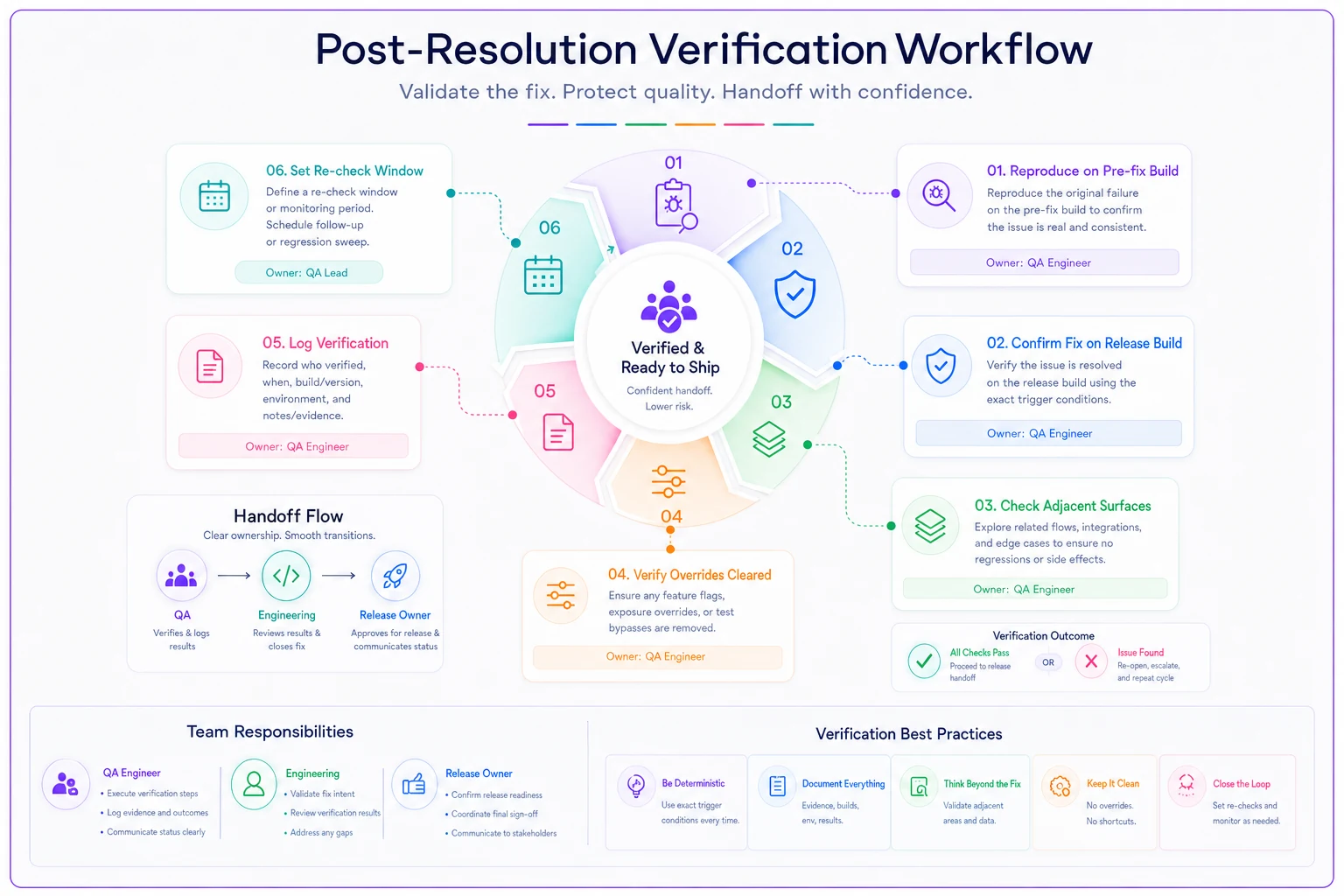
This mirrors the discipline in a good delivery risk triage worksheet: the scoring gets attention, but the verification follow-up is what actually prevents recurrence. Scoring tells you what to do. Verification tells you whether you did it.
A real scenario
A mid-sized B2B SaaS team — roughly 18 people across product and engineering, shipping on a two-week cadence — kept getting derailed by late-release firefights. Over about a quarter, they'd frozen four releases, and two of those freezes were for bugs that turned out to be separable. One feature could've just been pulled each time. They were averaging something like a day and a half of lost release time per month just from freeze indecision.
They put in a scorecard almost exactly like the bands above, plus a six-item exposure override list and a named freeze owner per release. Nothing fancy — a shared doc and a 1–5 scoring agreement.
The change wasn't dramatic, but it was real. Freeze decisions that used to eat 30–40 minutes of debate dropped to a few minutes because the two-axis score settled most of them before anyone got emotional. Over the next couple of months they froze once — a genuine data-exposure case that everyone agreed on instantly. The separable bugs got pulled and shipped as patches instead of halting whole releases. The verification log caught one "fixed" bug that hadn't actually cleared, before it shipped a second time.
The quieter win was the arguments that stopped happening. When the rule is written down and agreed to in advance, the 6 PM conference-room standoff just doesn't start.
Who shouldn't bother with this
If you ship once a month and rarely hit release-blocking bugs, a formal scorecard is overhead you don't need — a quick conversation covers it.
This system earns its keep when you're shipping frequently enough that release decisions recur, and when the same disagreements keep flaring up. The signal that you're ready for it isn't "we have bugs." Every team has bugs. It's "we keep having the same fight about whether a bug blocks the release, and it keeps coming out differently depending on who's in the room."
The whole point of writing down the bands, the overrides, and the verification steps is to move the hard thinking to a calm moment instead of an anxious one. The scorecard doesn't make the decision for you. It just makes sure you're deciding on the bug in front of you — not on how late the release already is.
Ready to boost your team's productivity?
Join 5,000+ teams using Workyly to streamline workflows, improve communication, and deliver projects faster.