


Short-cycle automations — the little Zapier flows, the scheduled scripts, the "when a form comes in, do X" rules — are the ones nobody treats seriously. They feel too small to break anything. That's exactly why they cause the messiest failures.
A big deployment gets a review, a staging environment, someone watching the dashboard. A five-step automation gets built on a Tuesday afternoon by whoever had the idea, turned on, and forgotten. Then three weeks later it quietly starts sending duplicate invoices, or tagging every new lead as "spam," or firing a "sorry we missed you" text to customers who were never contacted in the first place.
This is a preflight checklist for the non-engineer who owns these automations. Not a code review — a practical set of things to check before you flip the switch, plus the rollback triggers that tell you when to kill it fast. If you've already read our take on short-cycle triage automation patterns and guardrails, this is the deployment-day companion to it.
Why small automations fail louder than big ones
The failure math is counterintuitive. A large system fails slowly and visibly — errors pile up, someone notices, it gets rolled back. A short-cycle automation fails silently and fast, because its whole point is speed and volume.
A typical example: a marketing coordinator builds a flow — "when a contact's status changes to booked, send a confirmation email." Works perfectly in testing. What they didn't check: a nightly sync from the booking tool re-writes the status field on every record it touches, even when nothing actually changed. So the automation treats a routine sync as a fresh booking. Overnight, roughly 1,800 past customers get a confirmation email for an appointment they had months ago. Support fields angry replies all morning.
Nobody wrote bad logic. The logic was fine in isolation. The problem was the blast radius — the automation could touch far more records than the builder imagined, and it did so before anyone was awake to notice.
That's the core of preflight: you're not checking whether the automation works. You're checking what happens when the world doesn't behave the way you assumed.
The 5-step automation preflight checklist
Run these five checks in order before turning anything on. They take around 30–40 minutes for a simple flow. That's cheap compared to a morning of apologizing.
Stop losing track of your priorities.
Workyly helps you organize, assign, and track every task efficiently.
- Centralized task management
- Real-time collaboration
- Intelligent workflow automation
No credit card required
1. Test data that actually looks like production
The number one preflight failure is testing with clean, invented data. Real records are messy — missing fields, duplicate contacts, weird characters in names, phone numbers in four different formats.
-
A record missing the field your automation depends on
-
A duplicate contact (same person, two entries)
-
A record that was already processed once
-
An edge value — a $0 order, a blank email, an emoji in a name field
-
The highest-volume case you can find (the customer with 40 past orders)
Run the automation against these before anything else. If it can't gracefully handle a blank email field, you found that out now instead of at scale.
2. A monitoring query you can run in ten seconds
Before launch, write the single query or filter that answers: "Did this automation do something insane in the last hour?"
For most tools this is a saved view: "records modified by [automation] in the last 60 minutes." You want to glance at it and immediately see whether the count is 12 (normal) or 1,800 (disaster).
The mistake people make is assuming they'll "just notice" if something goes wrong. You won't. The automation runs in the background. Without a query you can pull up in seconds, your first signal will be a customer complaint — which means the damage is already done and public.
3. Failure-mode scenarios written down before launch
Spend ten minutes listing the ways this could go wrong. Not vaguely — specifically. For each one, decide in advance whether it's acceptable or a kill trigger.
| Failure mode | Likely cause | Acceptable? | Response |
|---|---|---|---|
| Fires on records it shouldn't | Trigger too broad | No | Pause immediately |
| Fires twice on same record | No dedupe / retry loop | No | Pause, dedupe check |
| Doesn't fire at all | Silent API failure | Sometimes | Monitor, fix in-day |
| Fires with blank/wrong values | Missing field handling | No | Pause |
| Fires slower than expected | Queue backlog | Usually | Monitor only |
The value here isn't the table — it's forcing yourself to think about duplicate fires and over-broad triggers before they happen. Those two are responsible for the large majority of short-cycle automation blowups.
4. Blast-radius minimization
This is the step that separates a small mistake from a company-wide one. Before launch, cap what the automation can touch, even if you're confident it won't need to.
-
Volume limit if it processes more than X records in one run, stop and alert. If your normal volume is 20–30/hour, set the ceiling around 100. Anything above that is a signal something's wrong, not a busy day.
-
Scope filter narrow the trigger to the tightest possible condition. Not "status changed" but "status changed to booked and record created in last 7 days."
-
Soft launch run it on a segment first — one location, one product line, internal test accounts — for a few days before opening it to everyone.
The over-broad trigger from that earlier example would have been harmless with a "created in last 7 days" filter attached. The blast radius shrinks from 1,800 records to maybe 5.
5. A rollback trigger with a named owner
Every automation needs a written answer to two questions: what number tells us to kill it, and who kills it.
Vague ownership is why bad automations run for hours. Someone sees the weird behavior, assumes someone else is handling it, and by the time it's clear nobody is, it's lunchtime. Write it down: "If the monitoring view shows more than 100 records in an hour, [name] pauses the automation. No approval needed."
The "no approval needed" part matters. Rollback should never wait on a meeting.
Save your monitoring query as a dashboard tile so the owner can spot spikes without hunting for the saved view.
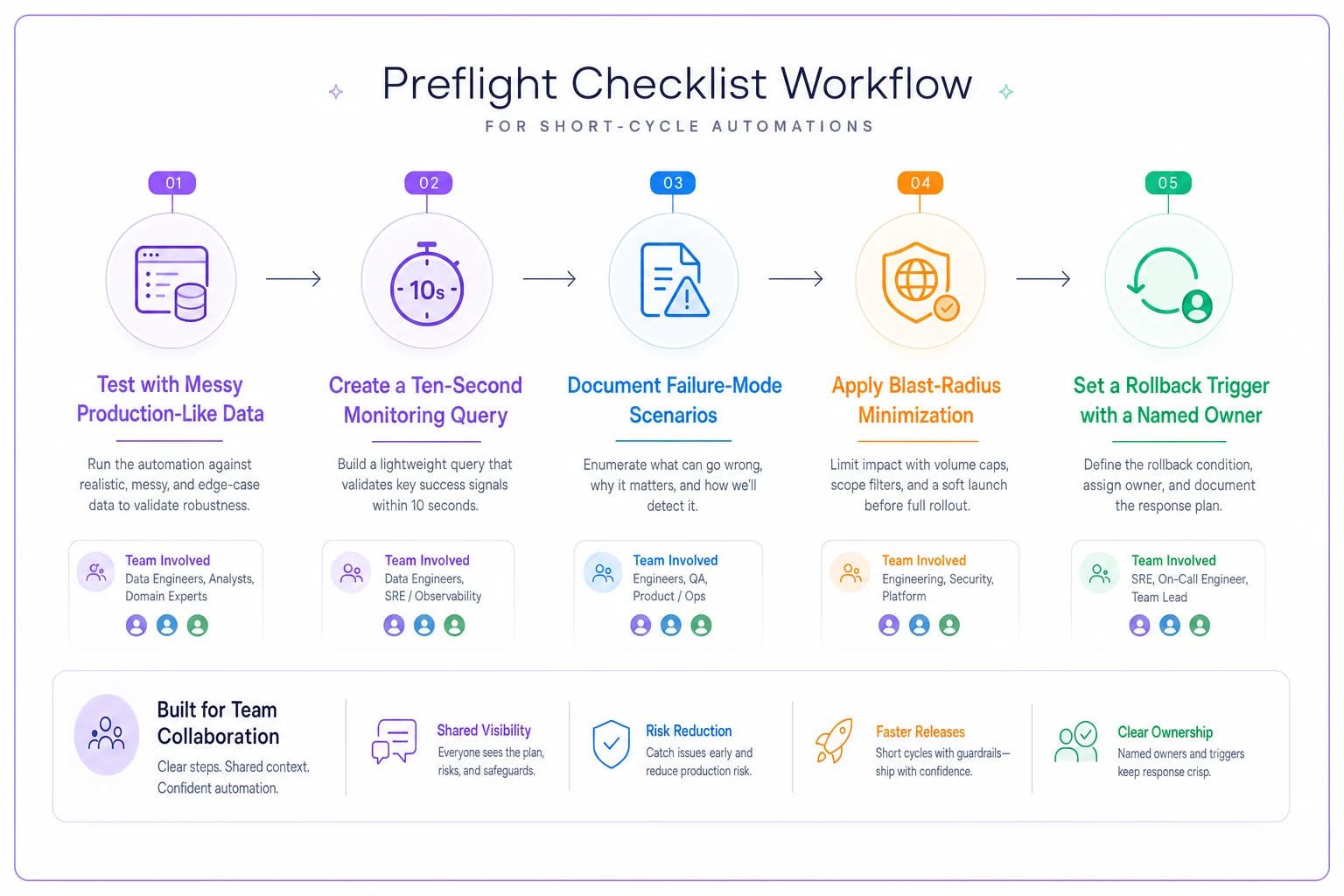
A quick visual like this can help new owners remember the order when they feel rushed.
The rollback playbook: what to do in the first ten minutes
When an automation misbehaves, the instinct is to investigate first. Wrong order. Stop the bleeding, then investigate.
-
Pause the automation. Not edit — pause. Editing while it's live can make things worse. Full stop first.
-
Pull the monitoring query. Confirm the scope
how many records, over what window, what did it actually change?
-
Freeze downstream effects if possible. If it sent emails, you can't unsend — but you can pause any follow-up automations before they compound the mess.
-
Draft the customer message early. If real people were affected, get a short correction drafted while you diagnose. A same-hour "please ignore that last email" lands far better than silence.
-
Only now, diagnose. With the bleeding stopped, figure out the root cause without pressure.
Teams that skip straight to diagnosis while the automation keeps running turn a 20-record problem into a 2,000-record one. The playbook is deliberately boring — boring is what you want when something's on fire.
A real scenario
A regional home-services company — about 25 staff, handling roughly 400–500 jobs a month — built a short automation to text customers a review request after a job was marked complete.
It worked fine for two weeks. Then a dispatcher bulk-updated around 260 old jobs to fix a reporting glitch, marking them "complete" again. The automation didn't know these were old. It queued review-request texts to 260 customers, some from jobs over a year prior.
Because there was no volume cap and no monitoring view, nobody caught it until customers started replying "what job?" Around 200 texts went out before someone paused it manually. The cleanup — apology texts, a few annoyed calls, one public review complaint — ate most of a day and dinged trust with customers they'd worked hard to keep.
The fix afterward was almost embarrassingly simple. They added a scope filter (only jobs completed in the last 3 days), a volume cap (stop if more than 40 in a run), and a saved monitoring view the office manager checks each morning. Same automation, same value — now with guardrails. It's run for months since without a single misfire.
The difference wasn't smarter logic. It was five minutes of preflight thinking that nobody had done the first time.
When preflight is overkill (and when it absolutely isn't)
You can skip most of this when:
-
The automation only touches internal records nobody sees
-
It affects a handful of items at most, ever
-
Nothing it does is hard to reverse (adding a tag, moving a card)
You must run the full checklist when:
-
It sends anything to customers — email, SMS, invoices
-
It can touch more records than you can count on your hands
-
It writes to a system others depend on for reporting or billing
-
It runs on a schedule while nobody's watching
The dividing line is simple: can this reach real people or money, and can it do so at volume? If yes, preflight is non-negotiable.
Anyone building customer-facing automations without a rollback owner should stop and assign one first. That's the single cheapest insurance you'll ever buy.
Where this fits in your broader delivery process
Preflight isn't a one-off. Treat it like a lightweight standard for any automation that goes live — the same way you'd triage delivery risk before a release. If you already run something like a delivery risk triage worksheet, fold the five checks and the rollback owner straight into it. New automations become just another risk line item, not a surprise.
The teams that avoid automation disasters aren't the ones with the best engineers. They're the ones who assume their small automations will misbehave eventually, and who decided ahead of time exactly how they'd catch it and shut it off. Test data, a ten-second monitoring query, a written failure list, a capped blast radius, and one named person with permission to hit pause — that's the whole game.
Build the checklist once. Run it every time.
Ready to boost your team's productivity?
Join 5,000+ teams using Workyly to streamline workflows, improve communication, and deliver projects faster.