


So you've got the governance plan. Maybe you ran a triage, maybe you've got a 30/60/90 roadmap taped to a wall somewhere. Good. But none of that tells you what to do at 9:15am on day four when a dependency slips, two engineers are blocked, and your sponsor wants a status update by noon.
That gap — between the plan on paper and the actual hour-by-hour work of keeping a restarted project moving — is where most relaunches quietly die again. Not dramatically. The project just loses momentum around day 12, nobody notices until day 20, and by day 30 you're back to the same stalled state you started from.
This piece is the ground-level companion to higher-level relaunch guidance. If you haven't already defined your triage questions and relaunch scope, start with the restart stalled projects triage and 30/60/90 cadence first, then come back here. This article assumes you already know what you're relaunching. It's about how you run the days.
The real failure mode nobody warns you about
It's not a lack of planning. It's the slow erosion of visibility in weeks two and three.
Here's how it actually plays out. The first week after relaunch runs on adrenaline. Everyone's in meetings, there's a kickoff energy, decisions get made fast. Then week two hits and the novelty wears off. The daily check that felt urgent on day 3 gets skipped on day 9. By day 14 the restart owner is "mostly" tracking things in their head. Two small risks that should've been flagged early compound into one big blocker. And because nobody logged the decision that caused it, there's no trail to walk back.
Restarted projects fail from under-observation, not under-planning. The plan was fine. The owner just stopped looking closely enough, soon enough, consistently enough.
The whole workflow below is built around one principle — keep the project visible to yourself every single day, even when nothing seems wrong. Especially when nothing seems wrong.
The daily momentum check (10–15 minutes, same time every day)
This is the single most important habit in the first 30 days. Not a standup. Not a team meeting. A short, private check you do before anything else, so you walk into the day knowing the actual state of things instead of guessing.
Stop losing track of your priorities.
Workyly helps you organize, assign, and track every task efficiently.
- Centralized task management
- Real-time collaboration
- Intelligent workflow automation
No credit card required
The structure is deliberately boring. Boring survives. Clever routines get abandoned by day 8.
Your daily momentum check, in order:
-
Movement — What moved since yesterday? If nothing moved on the critical path, that's your signal. Don't wait for standup to surface it.
-
Blockers — What's blocked right now, and does each blocker have an owner and a date? A blocker without an owner is just a complaint.
-
New risks — Anything new that could derail the next 5 days? Write it down even if it feels minor.
-
Decisions needed today — What's waiting on a call from you? Restart owners are often the bottleneck without realizing it.
-
One-line status — Write a single sentence describing project health today. Green/amber/red plus seven words. You'll use these later for your weekly email.
The whole thing fits on an index card. The discipline isn't in the complexity — it's in doing it on day 17 when you're tired and the project feels fine.
One mistake people make: treating the daily check as a reporting task instead of a detection task. You're not documenting for someone else. You're scanning for the small signals that haven't become problems yet. The index card is for you.
Here's a quick visual of the daily momentum check workflow.
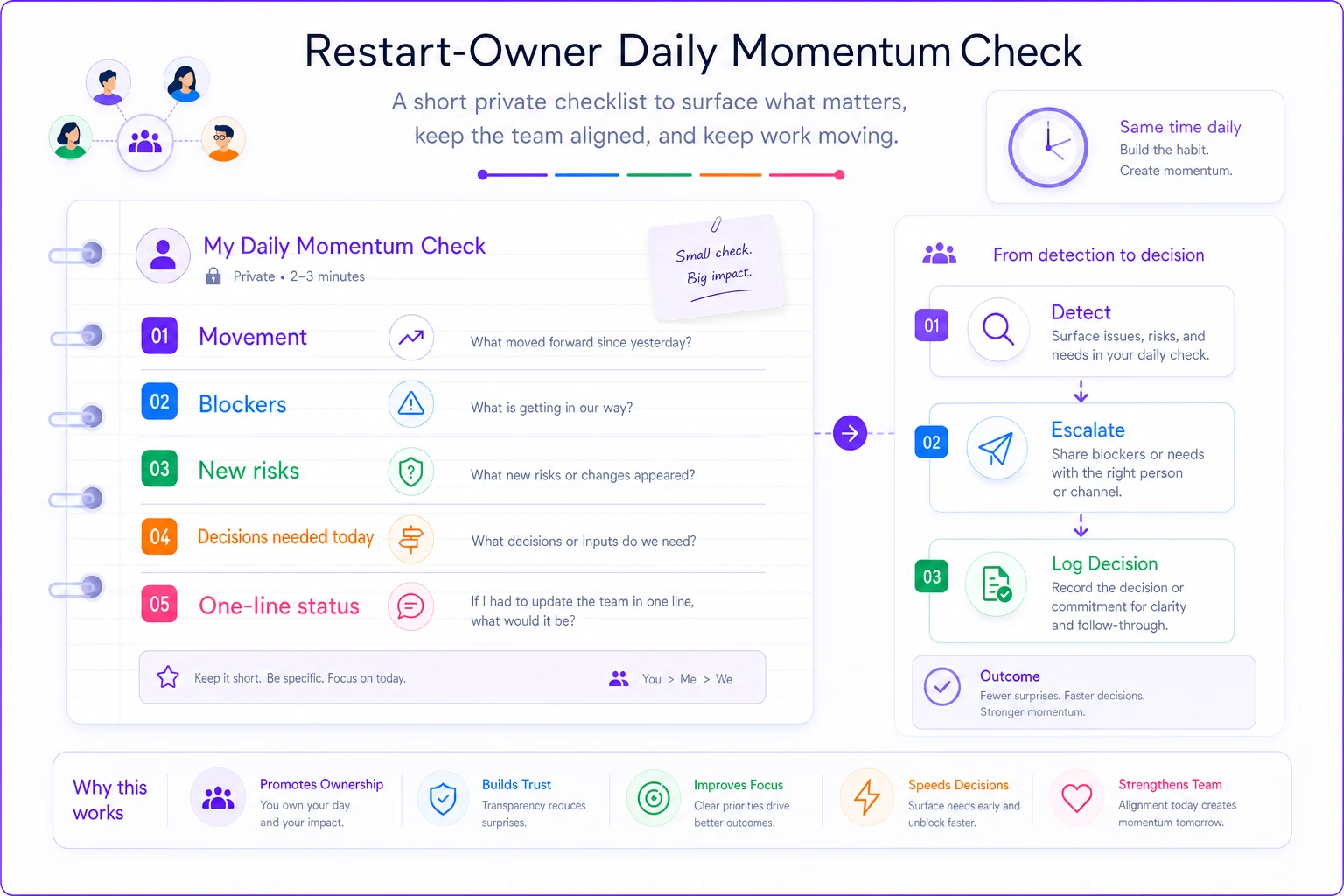
Use a tiny diagram like this when you're training a backup owner so they can follow the rhythm visually.
Week-by-week: the 30-day checklist
The month breaks into four distinct phases. Each has a different job. Trying to do stabilization work during week one, or discovery work during week four, is where owners waste energy.
| Week | Phase | Primary job | What "done" looks like |
|---|---|---|---|
| Week 1 | Re-establish | Confirm scope, owners, cadence | Every workstream has an owner and a next milestone |
| Week 2 | Stabilize | Clear early blockers, lock the rhythm | Daily check is automatic; first risks triaged |
| Week 3 | Prove | Ship something real and visible | One concrete deliverable stakeholders can see |
| Week 4 | Sustain | Prove the cadence holds without heroics | Project runs a full week without you firefighting |
Week 1 — Re-establish (Days 1–7)
-
Confirm the relaunch scope in writing and get the sponsor to acknowledge it (a reply email counts)
-
Assign a single named owner to every workstream — no shared ownership, no "the team owns it"
-
Set the meeting cadence and put it on calendars now, not "later this week"
-
Stand up your decision log and risk list (templates below) even if they start empty
-
Run the first weekly stakeholder meeting using the agenda below
-
Do the daily momentum check every day, including the awkward first one where there's nothing to report
Week 2 — Stabilize (Days 8–14)
-
Clear the first two or three blockers surfaced in week one — these are your credibility deposits
-
Triage every open risk and issue (routine below) and assign owners with dates
-
Confirm the daily check is now habit, not effort
-
Send your first full weekly status email (template below)
-
Watch for the day-9 momentum dip and name it out loud in the team meeting if you see it
Week 3 — Prove (Days 15–21)
-
Ship one visible deliverable — a demo, a working slice, a real artifact
-
Update the decision log with anything that got decided in the rush of shipping (this always gets skipped)
-
Run a mid-point risk review
which risks closed, which got worse, which are new
-
Give the sponsor something concrete to point to — progress nobody can see counts as no progress
Week 4 — Sustain (Days 22–30)
-
Run a full week where the cadence holds without you personally unblocking everything
-
Review the metrics dashboard trend, not just the snapshot (more below)
-
Hold a short 30-day review
what's working in the workflow, what to adjust for the next 30
-
Hand off or formalize anything that's still living only in your head
The month breaks into four distinct phases. Each has a different job. Trying to do stabilization work during week one, or discovery work during week four, is where owners waste energy.
Weekly meeting agendas (two meetings, not five)
Restart owners over-meet in week one and under-communicate by week three. The fix is two fixed meetings a week, each with a tight agenda, and nothing else recurring unless it earns its place.
Weekly team working meeting (30–45 min)
-
Health check (2 min) — Green/amber/red, one sentence. No discussion yet.
-
What moved (5 min) — Progress on the critical path only. Not everything. The critical path.
-
Blockers round (10 min) — Each blocker
owner, next action, date. If it can't be resolved here, it becomes a decision or an escalation.
-
Risks that got worse (5 min) — Only changes since last week. Don't re-read the whole list.
-
Decisions needed (10 min) — Make them live, in the room, and log them immediately.
-
Commitments for next week (5 min) — Each person says one thing they'll have done.
Weekly stakeholder/sponsor meeting (20–30 min)
-
One-slide status — Health, what shipped, what's next. That's the whole slide.
-
Decisions needed from them — Be specific. "I need you to approve X by Thursday" beats "we should discuss priorities."
-
Risks they need to know about — Only the ones that need their help or authority.
-
What I'm not asking for — One line confirming what's handled, so they don't start poking at things that are fine.
That last item is underrated. Sponsors fill silence with worry. Telling them explicitly what's under control keeps them from creating work by investigating settled things.
The decision log (the thing that saves you in week three)
Most restart owners skip the decision log because it feels like overhead during a fast-moving relaunch. Then week three arrives, someone asks "why did we drop that feature," and nobody can reconstruct the reasoning. The decision gets re-litigated, two days get burned, and the momentum you fought for in week two evaporates.
Keep it stupidly simple. A spreadsheet works fine.
| Date | Decision | Why (1–2 lines) | Decided by | Reversible? | Revisit date |
|---|---|---|---|---|---|
| Day 5 | Cut reporting module from relaunch scope | Not needed for sponsor's core use case; adds 2 weeks | Restart owner + sponsor | Yes | Day 30 review |
| Day 11 | Keep legacy auth for now | Replacing it blocks everything else; low risk short-term | Tech lead | Yes | 60-day gate |
The "reversible?" column does more work than it looks like. It tells you instantly which decisions you can make fast and alone, and which ones deserve a sponsor's sign-off. Reversible decisions should never slow you down. Irreversible ones should never be made in a hallway.
Risk and issue triage routine
The difference between a risk and an issue is simple: a risk hasn't happened yet, an issue has. Both need the same discipline — an owner and a date — but they move at different speeds.
Run this triage once a week, plus any time your daily check surfaces something new.
The triage, step by step:
-
Capture — Write it down the moment you spot it. Unwritten risks don't get managed.
-
Score it — Impact (high/med/low) and likelihood (high/med/low). Don't overthink it. A rough score beats no score.
-
Assign an owner — One name. The owner isn't necessarily the person who fixes it; they're the person who makes sure it gets fixed.
-
Set a follow-up date — When will you check on this? High-impact items get a 48–72 hour check, not a "next week."
-
Decide the action — Mitigate, monitor, or accept. Writing "accept" on purpose is far better than ignoring something by accident.
Watch out for what I'd call the comfortable risk — the one that's been amber for three weeks, hasn't gotten worse, and so everyone stops looking at it.
Watch out for what I'd call the comfortable risk — the one that's been amber for three weeks, hasn't gotten worse, and so everyone stops looking at it. Those are the ones that go red overnight. If a risk has been open longer than two weeks with no movement, that stagnation is the signal.
A simple metrics dashboard (five numbers, not fifty)
You don't need a BI platform for a 30-day restart. You need five numbers you can update in two minutes and read at a glance. The goal is trend, not precision.
-
Critical-path items completed this week — Is the core thing actually moving?
-
Open blockers — And how long the oldest one has been open
-
Open risks by severity — Just the counts
how many high, med, low
-
Decisions logged this week — Zero is a warning sign; it usually means decisions are happening off the record
-
Days since last visible deliverable — Climbing past 10 means stakeholders are losing confidence even if work is happening
Track these weekly in the same spot. The value isn't any single reading — it's watching the shape over four weeks. A restart where blockers tick down and deliverables tick up is healthy. One where "days since last deliverable" keeps climbing is in trouble, no matter how busy everyone feels.
This is also where a shared workflow or project platform earns its keep — not because it's fancy, but because it keeps these numbers in one place instead of scattered across your head, three Slack threads, and a spreadsheet only you can find. If the whole team can see the same five numbers, your weekly meetings get shorter and your daily check gets faster.
Ready-to-send status email templates
Status emails are where restart owners either build trust or quietly lose it. Too long, nobody reads them. Too vague, nobody trusts them. These two are deliberately short.
Weekly status email (send same day, same time, every week): > Subject: [Project] restart — Week 2 status — ON TRACK > > Quick status, same format each week. > > Health: On track (amber on one item, noted below) > > Shipped this week: Working login flow demoed to the team; reporting scope confirmed as out. > > Next week: First end-to-end slice for sponsor review by Thursday. > > Needs a decision from you: Approve staging environment access by Wed — blocks testing otherwise. > > One risk to flag: Vendor API docs still incomplete. Owner: [name]. Checking again Friday. > > Everything else is handled — no action needed there.
Escalation email (when something needs help now): > Subject: [Project] — need a decision by [date/time] — [one-line issue] > > What happened: [Two sentences, plain language.] > > Impact if unresolved: [What slips, and by how much.] > > Options: (1) [option + tradeoff] (2) [option + tradeoff] > > My recommendation: [Pick one. Don't make them choose blind.] > > What I need from you: A yes/no on [X] by [specific time].
The escalation template matters most. A restart owner who escalates with a recommendation gets trusted with more autonomy. One who escalates with just "help, what do we do?" slowly loses it.
When this level of structure is overkill
Not every restart needs all of this. If you're relaunching a two-person, two-week effort, the daily check and a single status email will do. The full cadence — two weekly meetings, decision log, metrics dashboard — earns its place when there are multiple workstreams, more than one stakeholder, or a history of the project stalling before.
Where this backfires: don't bolt the full ceremony onto a team that's already drowning in process. If people are skipping existing meetings, adding two more won't help. Strip back to the daily check and one weekly email first, prove the cadence works, then layer structure back in as needed. Process you don't follow is worse than no process — it trains everyone to ignore your rituals.
A short real scenario
A small internal tools team — about six people — had a reporting project that stalled twice over four months. Each restart lasted roughly two weeks before quietly dying. The pattern was always the same: strong first week, fading second week, dead by the third.
On the third attempt the lead ran the daily momentum check every day without exception and kept a decision log from day one. Nothing fancy — an index card and a spreadsheet. The difference showed up around day 10, the usual death point. A dependency on another team slipped, but because it was flagged in the daily check instead of discovered later, it got escalated the same day with a clear ask. The other team reprioritized within 48 hours instead of the week-plus it usually took.
They shipped a visible slice on day 19. The sponsor, who'd written off the project twice, actually came to the demo. By day 30 the project was running on its own cadence without the lead personally unblocking everything. The work wasn't harder than the previous attempts — it was just visible early enough to act on. That's the whole trick.
The thing to remember
The first 30 days after a relaunch are won or lost in the quiet middle weeks, not the loud first one. Your job as restart owner isn't to plan harder — the plan already exists. It's to stay close enough to the work, every single day, that small problems get caught while they're still small.
The daily check, the two weekly meetings, the decision log, the five numbers, the short emails — none of it is complicated. The hard part is doing it on day 17 when everything seems fine and your instinct says you can skip it. Don't skip it. The restart that survives is the one where the owner kept looking, even when there was nothing obvious to see yet.
The daily check, the two weekly meetings, the decision log, the five numbers, the short emails — none of it is complicated. The hard part is doing it on day 17 when everything seems fine and your instinct says you can skip it. Don't skip it. The restart that survives is the one where the owner kept looking, even when there was nothing obvious to see yet.
Ready to boost your team's productivity?
Join 5,000+ teams using Workyly to streamline workflows, improve communication, and deliver projects faster.