


Strategy tells you why to restart a project. This article is about the thirty days after you've made that call — the part where most restarts quietly die again.
You've probably already done the diagnostic work. If you haven't, go read the triage questions and MV relaunch plan first, because this playbook assumes you've already scoped the minimum viable relaunch and picked a target. What follows is the operational layer — the daily and weekly workflows, board columns, ticket templates, RACI, and escalation steps that turn "we're restarting this" into shipped work by day 30.
Nobody warns you about this: stalled projects don't fail the second time because of strategy. They fail because the restart has no operating rhythm. People show up to a kickoff, feel good about it, and then slide back into the same ambient chaos that killed the project the first time. The entire point of a 30-day restart workflow is to install rhythm before motivation runs out — and motivation usually runs out around day 9 or 10, which is exactly where most relaunches start wobbling.
Why restarts stall the second time
A dead project carries baggage. There's a half-finished branch nobody wants to touch, three decisions that were "almost final," and at least one stakeholder who's already written the whole thing off. When you restart, all of that comes back with it.
The pattern is pretty consistent. Week one feels productive — lots of cleanup, lots of talking. Week two, the original ambiguity resurfaces because nobody formally closed the open decisions from the last attempt. Someone asks "wait, did we ever decide on X?" and suddenly you've burned four days of a thirty-day window re-litigating something the previous team already argued about.
A 30-day restart workflow kills this by front-loading decision closure and making momentum visible every single day. Not with status meetings — with a board state anyone can read in ten seconds.
The board setup you actually need
Most restart boards fail because they copy a normal delivery board. A restart isn't normal delivery. You have a compressed window, a trust deficit, and a pile of ambiguous legacy work sitting in the backlog. Your columns should reflect that reality.
Stop losing track of your priorities.
Workyly helps you organize, assign, and track every task efficiently.
- Centralized task management
- Real-time collaboration
- Intelligent workflow automation
No credit card required
| Column | What goes here | WIP guidance |
|---|---|---|
| Intake / Unscoped | Legacy items and new asks not yet broken down | No limit — but it should shrink daily |
| Ready (scoped + owned) | Work with an owner, acceptance criteria, and no open decisions | 1.5× team size |
| In Progress | Actively being worked | ~1 per person |
| Blocked | Anything waiting on a decision, dependency, or person | Visible, loud, reviewed daily |
| Verify | Done but needs a check before it counts | 2–3 max |
| Done (this week) | Shipped/merged, resets Monday | — |
Two non-obvious rules make this work.
First, Blocked gets reviewed before In Progress in every stand-up. In normal delivery you glance at blockers. In a restart, blockers are the work — they're the fossils from attempt one. Anything sitting in Blocked for more than 48 hours escalates automatically (more on that below).
Second, Done resets every Monday. Restart teams need to feel weekly output. A column that's accumulated 60 cards since kickoff tells you nothing useful. A column with 7 cards this week versus 11 last week tells you whether momentum is actually holding.
In Jira or Trello, mirror this exactly. For Trello, use labels for decision-status (decision-open, decision-closed) and a Butler rule to flag any card in Blocked older than two days. In Jira, a simple JQL filter — status = Blocked AND updated <= -2d — feeding a dashboard widget does the same job without much ceremony.
The daily momentum-check (the part most teams skip)
The stand-up isn't the momentum check. The stand-up is coordination. The momentum check is a 90-second solo ritual the PM or tech lead does before the stand-up — usually with coffee, looking at three numbers:
-
Cards that moved right yesterday — any forward motion at all?
-
Days since the oldest Blocked card entered Blocked — your decay clock.
-
Open decisions logged but not closed — your ambiguity debt.
If cards moved right, the restart is breathing. If the oldest blocker is creeping past two days, something's rotting. If open decisions are climbing instead of falling, you're heading straight back to the same swamp that killed the project the first time.
Do the 90-second check before the stand-up, with coffee in hand, so you catch rot quietly and early.
This takes less time than reheating the coffee. Doing it daily is what separates restarts that ship from restarts that limp into month two with nothing to show.
A quick visual of the ritual can help teams align on the practice.
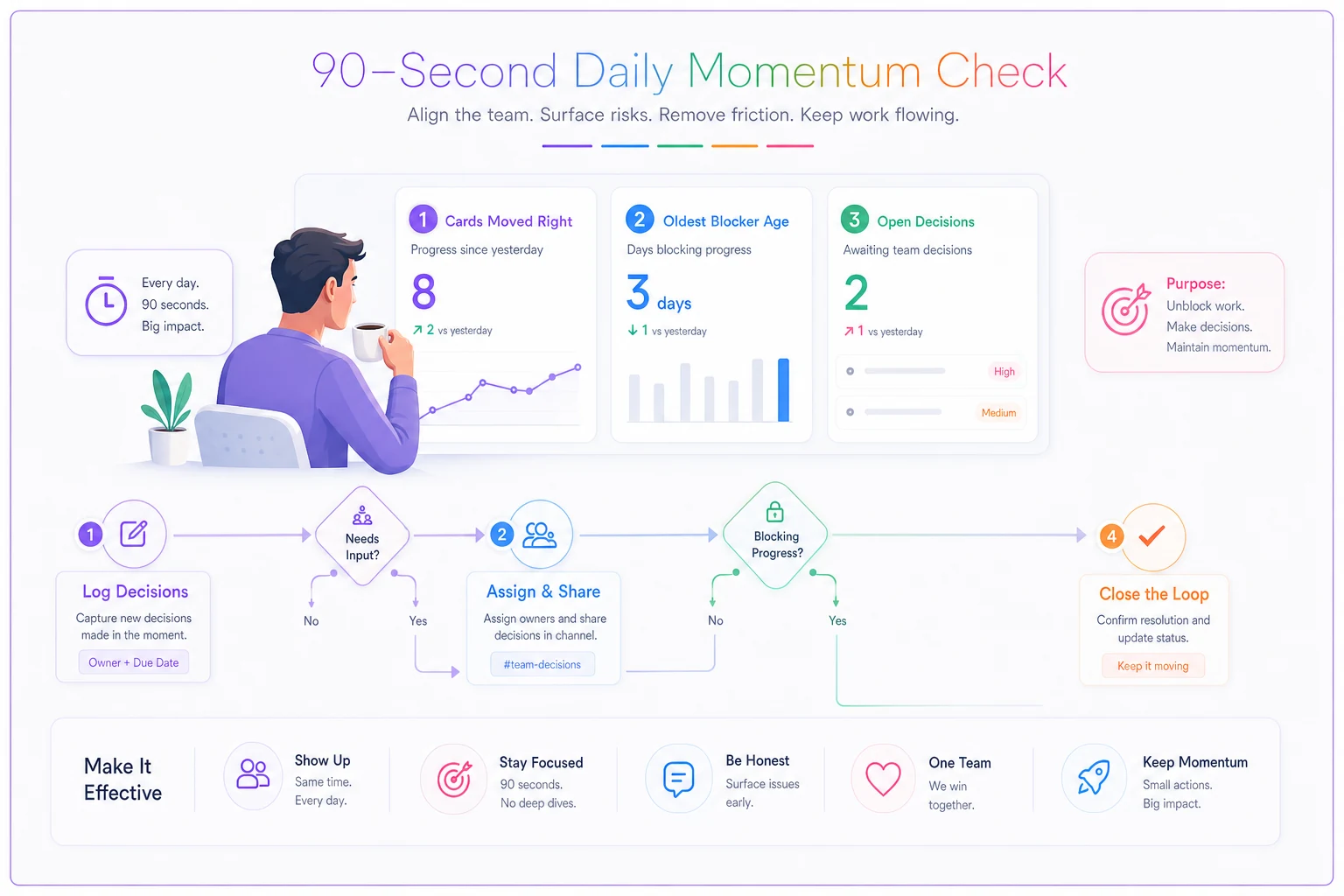
Keep it habit-level simple: look, decide, escalate if needed.
The day-by-day 30-day checklist
Structured in three roughly ten-day arcs: Stabilize, Build, Prove. Dates are working days, so adjust for your calendar.
Days 1–3 — Clear the fog
-
Import all legacy work into Intake, untouched. Don't clean it yet.
-
Hold a single 90-minute decision-closure session. Every "almost decided" item from attempt one gets closed, killed, or logged as a formal open decision with an owner and a due date.
-
Stand up the board and the decision log.
-
Write the one-sentence restart goal where everyone can see it. If you can't write it in one sentence, the MV scope is still too wide.
Days 4–6 — Scope the first shippable slice
-
Break the MV target into work that fits inside 30 days with room to spare. Aim to be "done" by day 24, not day 30.
-
Fill the Ready column. Nothing enters Ready with an open decision attached.
-
Assign owners using the RACI below.
-
First daily stand-up runs on day 4.
Days 7–9 — The wobble zone
-
This is where restarts historically die. Expect energy to dip.
-
Run your first triage meeting (agenda below). Kill scope that's creeping.
-
Clear every blocker older than 48 hours, even the ugly ones.
-
First weekly stakeholder sync lands around day 8 or 9.
Days 10–12 — First visible output
-
Something real should ship or merge by day 10. Even small. Visible output is the antidote to restart skepticism.
-
Reset the Done column, record week-one throughput.
Days 13–18 — Build the core
-
Steady delivery. Protect the stand-up from becoming a status meeting.
-
Keep Intake shrinking. If it's growing, you've reopened intake too wide.
-
Mid-point decision-log review on day 15 — are decisions closing faster than they open?
Days 19–24 — Converge toward done
-
Pull scope in, not out. Resist the late-stage temptation to add "one more thing."
-
Verify column discipline matters most here. Nothing counts as done until it clears Verify.
-
Target
MV slice functionally complete by day 24.
Days 25–27 — Harden and check
-
Run acceptance checks against your original MV criteria.
-
Clear the Blocked and Verify columns to zero.
-
Draft the 30/60/90 handoff from here.
Days 28–30 — Close the loop
-
Final stakeholder sync with a demo, not a slide deck.
-
Record final metrics against baseline.
-
Formally move the project from "restart" status into normal cadence — or make an explicit call to stop.
Follow the arcs and treat the dates as working-day targets.
Meeting agendas that don't waste the window
You get three meetings. Any more and you're eating the delivery time you're supposed to be protecting.
Daily stand-up — 12 minutes, hard stop
-
Walk the board right to left
Verify → In Progress → Blocked → Ready.
-
Each blocker gets a named owner and a "resolve by" time before the meeting ends.
-
No problem-solving in the room. Anything needing discussion gets a 15-minute slot after, with only the relevant people.
Weekly triage — 30 minutes
-
Review Intake. Decide keep / adapt / kill for each item. No "we'll decide later."
-
Review open decisions. Anything past its due date escalates.
-
Confirm the week's shippable target.
Stakeholder sync — 25 minutes, weekly
-
Show the Done column and week-over-week throughput.
-
Surface every active blocker that needs a decision they own.
-
One ask per sync
the single thing you need from them this week. Stakeholders ignore lists; they respond to one clear ask.
Keep meetings short and outcome-focused.
RACI for restart teams
Restart teams lose clarity on ownership faster than normal teams because everyone assumes someone from "last time" still owns things. Make it explicit on day 1.
| Activity | Responsible | Accountable | Consulted | Informed |
|---|---|---|---|---|
| Decision closure | PM | Product owner | Tech lead | Stakeholders |
| Scope cuts | Product owner | Product owner | PM, tech lead | Team |
| Blocker resolution | Item owner | Tech lead | PM | Team |
| Daily momentum check | PM | PM | — | — |
| Stakeholder communication | PM | Product owner | Tech lead | Stakeholders |
| Verify / acceptance | Tech lead | Tech lead | QA/reviewer | PM |
The one that gets skipped most: decision closure has a single accountable owner. When decisions are "the team's" to close, they never close. Give it to the product owner and let the PM chase it daily.
Ticket and decision-log templates
Restart ticket template
-
Title (verb + outcome)
-
Owner
-
Acceptance criteria (how we know it's done)
-
Open decisions blocking this? (yes/no — if yes, link the decision)
-
Legacy baggage note (anything inherited from attempt one worth knowing)
-
Verify step
Decision-log entry
-
Decision ID + one-line summary
-
Status
open / closed / reversed
-
Owner + due date
-
Options considered (one line each)
-
The call + the reason
-
What it unblocks
Keep the decision log in one visible place — a pinned Confluence page, a shared sheet, a Notion table, whatever fits the team. The format matters less than the discipline of logging why a decision was made. Around day 20, someone will ask "why did we decide this?" and "we discussed it" is not an answer that holds.
Automation rules worth setting up
Keep this light. The goal is to surface rot, not to build a machine.
-
Blocked older than 48h → auto-flag + notify PM. Trello Butler or a Jira filter does this in minutes.
-
Card moves to In Progress with an open linked decision → auto-comment warning. Stops work starting on ambiguous items.
-
Weekly Monday automation → archive Done cards, post throughput count to the team channel. Makes weekly output visible without anyone compiling it manually.
-
Open decision past due date → escalate to product owner. Ties directly into your escalation lane.
Four rules. More automation than that on a 30-day effort is usually someone avoiding the actual work.
Escalation steps
Escalation on a restart should be fast and boring. Three tiers:
-
Blocked 48h → PM owns resolution, raised in next stand-up.
-
Blocked 72h or decision past due → product owner steps in, resolved within one business day.
-
Blocked 5 days or scope dispute → stakeholder sync emergency item, decision forced within 24 hours.
The point is the clock, not the hierarchy. A restart can't absorb a blocker sitting for a week — that's a third of your window gone.
Success metrics that feed the 30/60/90 cadence
Don't measure velocity. A restart's velocity is meaningless because the baseline is "dead." Measure these instead:
-
Weekly throughput (cards done per week, trending up)
-
Blocker decay time (hours blockers sit before resolution — should fall)
-
Decision closure rate (closed vs opened per week — closing should outpace opening)
-
Time to first visible output (did something ship by day 10?)
-
MV completion against day-24 target
These five feed directly into the 30/60/90 structure from the MV relaunch and cadence plan. At day 30, if throughput is trending up and blocker decay is trending down, you graduate the project into normal 60/90 cadence. If throughput is flat and blockers keep piling, that's your signal to make a hard call rather than restart a third time.
A quick real scenario
A four-person platform team at a mid-sized logistics company had an internal reporting tool that had stalled for about five months — half-built, abandoned when priorities shifted, and widely regarded as cursed.
Their first restart attempt failed because they jumped straight into the backlog without closing roughly nine open decisions left over from the original attempt. Three weeks in, they were arguing about the same data model choice that had stalled things originally.
Second attempt, they ran the day-by-day version above. Day one, they closed or formally logged every open decision. First visible output shipped around day 11. Blocked cards never sat longer than two days because the 48-hour flag forced the issue. By day 26 the MV reporting slice was in users' hands — about three weeks faster than the first failed restart, mostly because they stopped re-litigating questions that had already been settled.
The tool wasn't more technically complex the second time. The difference was entirely rhythm and decision hygiene.
When this makes sense — and when it doesn't
This workflow fits a project that's genuinely worth restarting and can show a shippable slice inside 30 days. It's built for that specific window.
It's a bad fit when the project needs more than 30 days just to produce anything visible — compress the scope or don't restart yet. It's also wrong when the real problem is that nobody actually wants the project; a tighter workflow won't manufacture demand that doesn't exist.
Who should skip this entirely: teams whose stall was caused by a missing dependency or an unresolved external decision outside their control. No amount of daily stand-up rhythm fixes a project waiting on a vendor contract or an executive call that hasn't happened. Resolve that first, then restart.
The honest version of a restart isn't "let's try harder." It's installing enough rhythm that the project can't quietly die the way it did the first time — and being willing to stop it on purpose if the metrics say so by day 30.
Ready to boost your team's productivity?
Join 5,000+ teams using Workyly to streamline workflows, improve communication, and deliver projects faster.