

After helping dozens of teams implement their first team productivity operating system, I've watched the same pattern play out. Teams dive into comprehensive frameworks, push everyone through massive training sessions, then wonder why adoption collapses after two weeks. The ones that actually stick with it roll things out in careful phases, letting each layer stabilize before adding complexity.
The difference between teams that successfully adopt operational systems and those that abandon them after a month almost always comes down to implementation approach. Not the tools, not the budget, not even leadership buy-in—though that helps. It's whether they treat the rollout as an all-or-nothing sprint or a phased evolution.
Why most operating system implementations fail
Teams typically approach operational transformation like renovating a house while living in it—except they try to gut every room at once. I watched a 50-person product organization attempt this. They introduced new project tracking, changed their meeting structure, implemented capacity planning, and overhauled their communication channels all in the same quarter. Three months later, they'd essentially reverted to email and spreadsheets.
The core mistake is treating operational systems as technology problems rather than behavior change challenges. When you introduce fifteen new processes simultaneously, people don't adopt fifteen processes—they adopt zero and find workarounds.
Another common killer: governance without gradual buy-in. Teams create elaborate RACI charts and approval workflows before anyone understands why those structures exist. It feels like bureaucracy because, at that stage, it is bureaucracy. The value only becomes clear after teams experience the specific coordination failures that governance would have prevented.
Most frameworks also ignore the reality of ongoing work. Teams can't pause deliverables for a three-week implementation bootcamp. They need systems that layer onto existing work patterns, then gradually replace them.
The phased approach that actually works
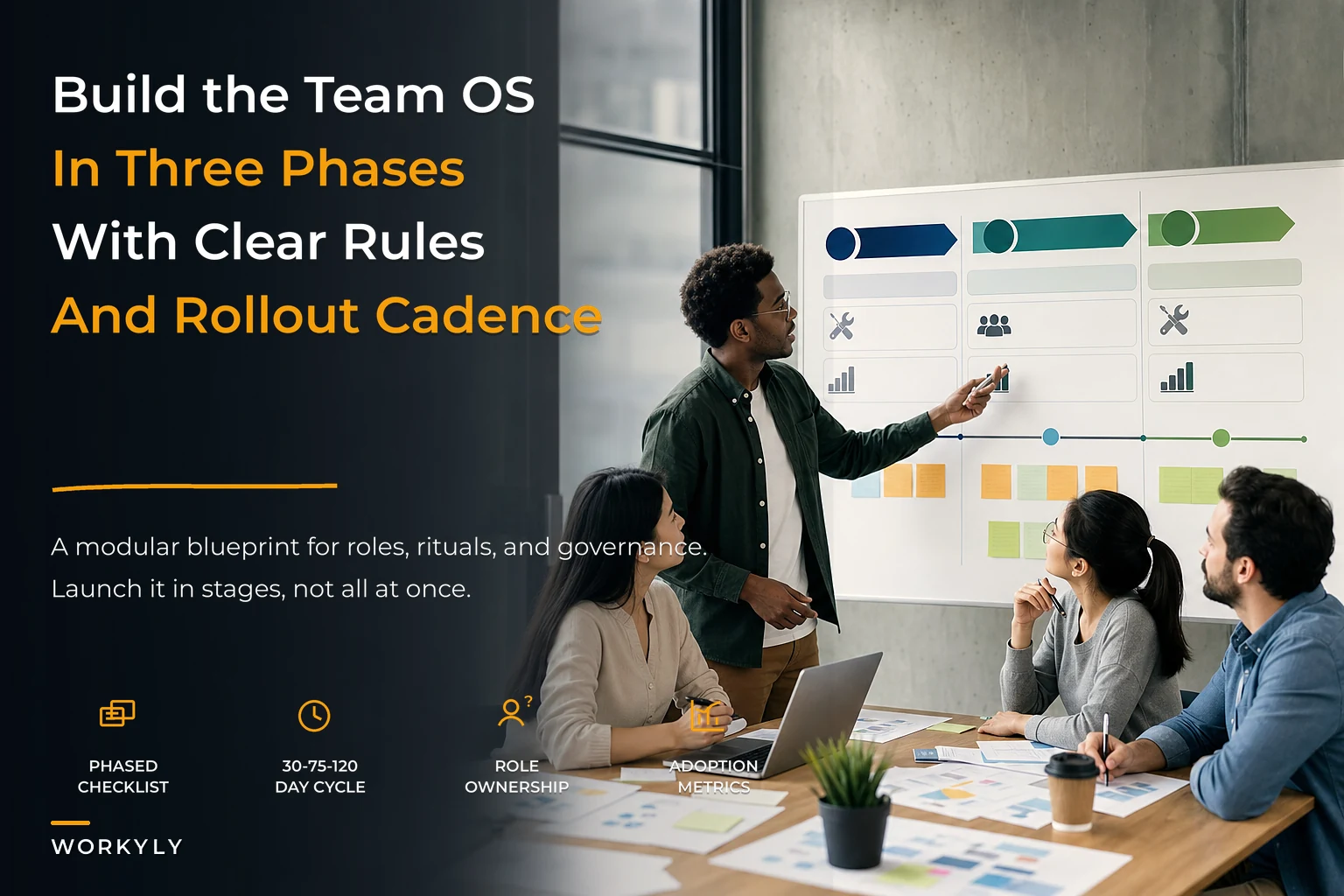
Instead of a comprehensive overhaul, successful teams build their operating system in three distinct phases, each taking roughly 30-45 days to stabilize.
Stop losing track of your priorities.
Workyly helps you organize, assign, and track every task efficiently.
- Centralized task management
- Real-time collaboration
- Intelligent workflow automation
No credit card required
Phase 1: Foundation (Days 1-30) Start with the absolute minimum—where work lives and how it moves. Pick one source of truth for tasks, whether that's Jira, Asana, or even a well-structured spreadsheet. The tool doesn't matter as much as the agreement: this is where work gets tracked.
-
Log work in one place
-
Update status twice a week
-
Flag blockers when they appear
That's it. No complex workflows, no elaborate categorization, no automated handoffs. Just basic visibility into what exists and whether it's moving.
A marketing team started here with just their campaign calendar. Nothing fancy—every campaign, its owner, its status, and its target date in one shared view. Within two weeks, they'd discovered three campaigns targeting the same audience segment in the same month. This had happened before, repeatedly, but never surfaced because people tracked work in different tools.
Phase 2: Coordination (Days 31-75) Once teams reliably track work in one place, add the coordination layer. Structured handoffs, clear ownership, basic governance.
-
A simple ownership model—every task has exactly one owner
-
A basic handoff protocol—what "ready for review" actually means
-
Escalation paths—who unblocks what
-
Team ceremonies that actually drive work forward
This is where most teams want to implement complex RACI matrices. Resist that. Start with binary ownership—you either own something or you don't. The nuanced "consulted" and "informed" roles can wait until Phase 3.
One development team implemented this by adding two fields to their tracking: "blocked by" and "next action owner." Within days, they could see that roughly 40% of their blocked items were waiting on the same two people in operations. They'd suspected this bottleneck for months but couldn't prove it without clean data.
Phase 3: Optimization (Days 76-120) Only after work tracking and coordination become muscle memory should you add optimization mechanisms—capacity planning, velocity tracking, predictive metrics.
-
Capacity allocation by project or initiative
-
Velocity baselines and trending
-
Automated alerts for at-risk items
-
Retrospective capture that feeds back into planning
The trap here is implementing metrics before you have clean data. If people aren't consistently updating status in Phase 1, your velocity calculations in Phase 3 will be fiction.
Here's a simple visual of the three phases and how they flow into each other.
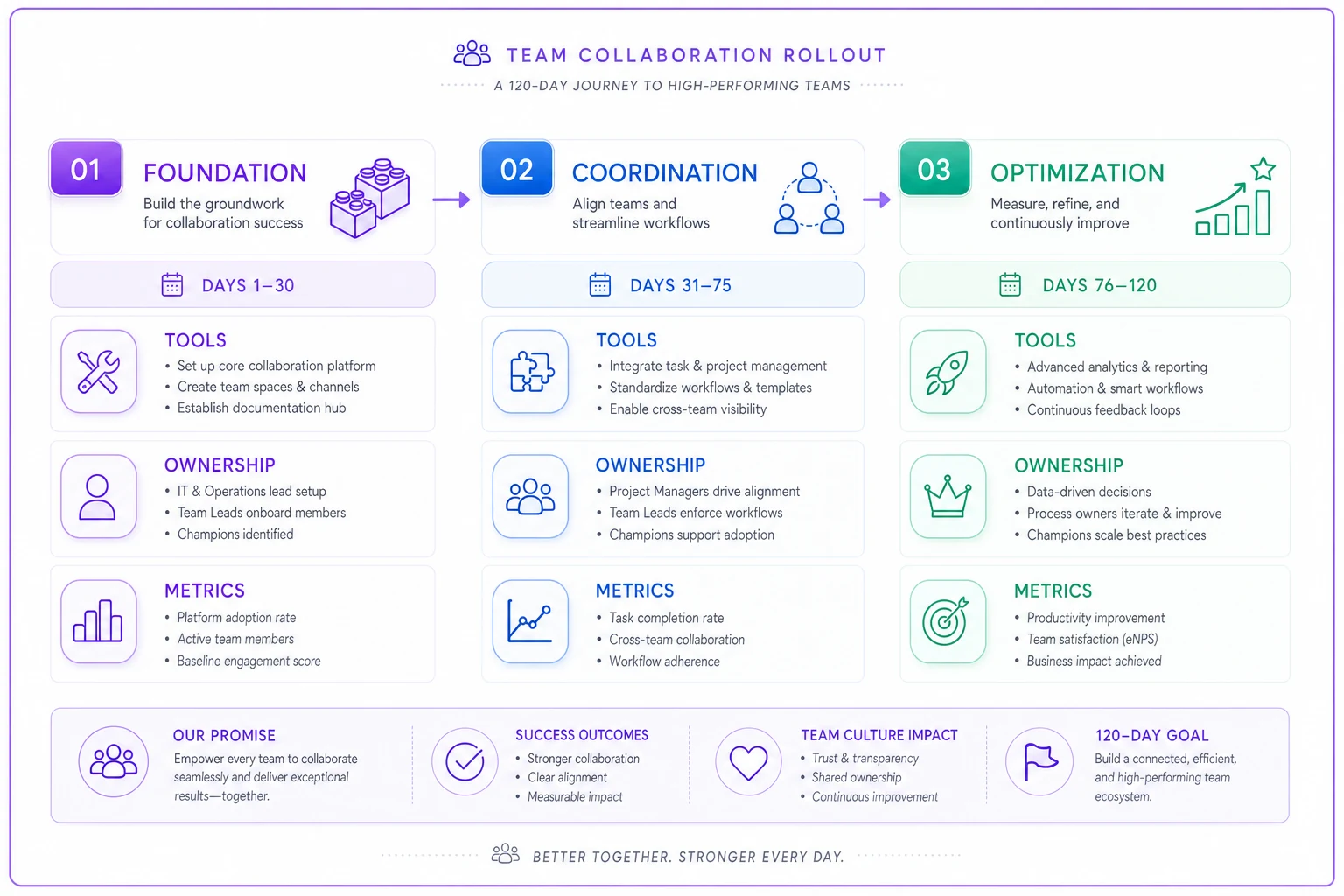
Only after the phases become routine should you add automation or predictive features; they rely on consistent data inputs.
Roles and responsibilities matrix
Unlike traditional RACI charts that assign four different involvement levels, start with this simplified version:
| Role | Foundation Phase | Coordination Phase | Optimization Phase |
|---|---|---|---|
| System Owner | Picks tools, creates initial structure, runs training | Defines handoff protocols, establishes escalation paths | Sets metrics, builds dashboards, identifies automation opportunities |
| Team Leads | Ensure team logs work, reviews weekly status | Assigns ownership, manages dependencies | Allocates capacity, reviews velocity |
| Individual Contributors | Logs tasks, updates status twice weekly | Owns assigned work, flags blockers | Estimates effort, tracks time |
| Stakeholders | Views status reports | Gets notified of impacts | Reviews metrics dashboards |
The System Owner role is critical and often overlooked. This isn't necessarily a manager—it's whoever has both the operational mindset and the political capital to drive adoption. In smaller teams, it might be a senior IC who cares about process. In larger organizations, it tends to be someone from program management or operations.
Cadence and ceremonies
Don't bother with daily standups and weekly planning sessions until the foundation is solid. Start with two ceremonies:
Weekly Sync (Foundation Phase) 30 minutes. Review everything in progress, flag anything blocked, confirm next week's priorities. Keep it tight.
Bi-weekly Retrospective (Coordination Phase onwards) 45 minutes. What broke in the process? What coordination issues appeared? One process improvement to try next cycle.
The temptation is to add more meetings as issues surface. Don't. Use async updates for most coordination. Only escalate to synchronous discussion when async isn't resolving something within 48 hours.
One product team tracked this carefully: they started with four hours of weekly ceremonies, cut it down to 90 minutes of synchronous time plus daily async updates, and actually improved their deployment frequency by around 30%. The key was being strict about what needed real-time discussion versus what could be handled through comments and status updates.
Use async updates for most coordination and reserve syncs for items unresolved after 48 hours.
Be strict about meeting purpose and only invite people who will actively contribute to resolving blockers or making decisions.
Templates that actually get used
Most teams build elaborate templates that people ignore. Start minimal, and add fields only when their absence causes a real problem.
Task Template (Foundation)
``
Title: [Clear description of deliverable]
Owner: [Single name]
Status: [Not Started | In Progress | Blocked | Complete]
Due Date: [Realistic date]
``
Handoff Template (Coordination)
``
From: [Owner name]
To: [Next owner name]
Deliverable: [What's being handed off]
Definition of Done: [3-5 bullet points]
Dependencies: [What this blocks]
Context: [One paragraph max]
``
Capacity Plan Template (Optimization)
``
Team Member: [Name]
Weekly Capacity: [Hours available]
Committed: [Hours assigned]
Buffer: [20-30% for unexpected work]
``
Notice what's missing: priority matrices, story points, elaborate acceptance criteria. These can be valuable eventually, but not until the basics are habitual.
Governance without the bureaucracy
Governance sounds heavy, but it's really just agreements about how decisions get made. Start with three levels:
Level 1: Individual discretion Changes that affect only your own work. No approval needed—just update status after the fact.
Level 2: Team notification Changes that affect other team members. Notify before making the change and proceed unless someone objects within 24 hours.
Level 3: Approval required Changes that affect timeline, budget, or scope. Requires explicit approval from a designated approver. Document the decision and reasoning.
The common mistake is putting too much in Level 3. Start with almost everything in Level 1, and only escalate based on actual problems. A design team found that around 90% of their "approval required" decisions were rubber-stamped anyway. They moved these to Level 2, cut approval cycles from days to hours, and leadership still had adequate visibility.
Rollout checklist and timeline
Week 1-2: Preparation
-
Identify System Owner
-
Choose single source of truth tool
-
Create basic task template
-
Schedule kickoff session
-
Document current pain points
Week 3-4: Foundation Launch
-
All work logged in one place
-
Everyone knows how to update status
-
First weekly sync completed
-
System Owner available for questions daily
-
Success metric
80% of work visible
Week 5-8: Foundation Stabilization
-
Status updates happening consistently
-
Blockers identified within 48 hours
-
Weekly sync taking <30 minutes
-
Team suggesting process improvements
-
Success metric
90% status accuracy
Week 9-10: Coordination Launch
-
Ownership model documented
-
Handoff protocol tested
-
Escalation paths clear
-
First retrospective completed
-
Success metric
Clear owner for every task
Week 11-14: Coordination Stabilization
-
Handoffs happening smoothly
-
Blockers resolved within defined SLAs
-
Dependencies tracked accurately
-
Retrospectives generating improvements
-
Success metric
50% reduction in "who owns this?" questions
Week 15-16: Optimization Launch
-
Capacity planning in place
-
Velocity baseline established
-
Automated alerts configured
-
Metrics dashboard live
-
Success metric
Capacity vs. actual within 20%
Week 15-16: Optimization Launch
Warning signs and course corrections
Watch for these indicators that you're moving too fast:
People creating shadow systems. If team members maintain separate spreadsheets or task lists alongside the main system, you've added complexity too quickly. Roll back to the previous phase and stabilize before moving forward.
Status updates becoming fiction. When updates say "in progress" for three weeks straight, people are updating because they have to, not because it helps them. Simplify the status categories or reduce update frequency.
Ceremonies becoming status theater. If your weekly sync devolves into people reading their task lists aloud, either make the meeting about problem-solving or kill it and go async.
Governance bypassing. When every decision becomes an "emergency approval" that skips the process, your governance is too rigid for your current pace. Loosen the constraints until normal work can flow through normal channels.
Who should not attempt this
Teams smaller than five people. The overhead isn't worth it. Use a simple shared task list and weekly check-ins until you grow.
Organizations in active crisis. If you're fighting fires daily, you need triage, not process optimization. Stabilize first, systematize second.
Teams with less than six months runway. The three-phase approach takes roughly four months to fully implement. If the team might not exist in six months, focus on shipping, not process.
Distributed teams without async culture. If your team insists on synchronous communication for everything, fix that problem first. The operating system depends on async updates to function.
Measuring success
Skip the vanity metrics like "percentage of tasks tracked" or "number of retrospectives held." Measure outcomes instead.
Phase 1 Success:
-
Time to find information about any project
under 2 minutes
-
Surprise discoveries in weekly syncs
decreasing week over week
-
Team members who know what others are working on
more than 80%
Phase 2 Success:
-
Blocked time for tasks
less than 20% of duration
-
Handoff rework
less than 10% of tasks
-
Escalations needed
decreasing month over month
Phase 3 Success:
-
Planned vs. actual capacity
within 15%
-
Velocity variance
stabilizing within a 10% range
-
Predictable delivery rate
above 85% of commitments met
The trap here is implementing metrics before you have clean data. If people aren't consistently updating status in Phase 1, your velocity calculations in Phase 3 will be fiction.
The reality of partial adoption
Even with solid execution, expect somewhere between 70-80% adoption in most teams. The remaining percentage will find workarounds, maintain shadow systems, or comply minimally. This is actually fine—systems don't need perfect compliance to deliver value.
What matters is that core workflows run through the system. If 80% of work is visible, coordinated, and tracked, you've dramatically improved from the typical baseline of 30-40% visibility that most teams without systematic operations are working with.
A finance team hit exactly 75% adoption after four months. The holdouts were senior analysts who'd worked there for over a decade and had their own established methods. Rather than force compliance, the team built a simple integration—the analysts updated status weekly in a basic format, and someone else translated that into the system. Not ideal, but functional.
Building on the foundation
Once all three phases stabilize—usually around month five or six—you can add sophistication. This might include cross-team dependency tracking, resource allocation across projects, predictive analytics for delivery dates, automated workflow triggers, and AI-powered bottleneck identification.
The key is that these enhancements layer onto a stable foundation. Teams that skip straight to sophisticated features without basic operational discipline end up with expensive tools that nobody uses correctly.
Modern operational platforms can accelerate adoption by automating the tedious parts—status collection, update reminders, dependency detection. But the automation only helps after people understand the basic workflows. AI can collect status updates, but only after teams actually understand what "blocked" versus "in progress" means for their specific work.
The compound effect
The real value of a team productivity operating system isn't visible in month one or even month three. It compounds over time as clean operational data enables better decisions.
After six months, teams typically see 30-40% fewer surprise delays, around 25% less coordination overhead, noticeably faster onboarding for new team members, and a lot less time spent in status meetings.
After a year, the operating system becomes invisible infrastructure. Teams can't imagine working without it, the same way they can't imagine working without version control or shared documents.
The phased approach might feel slow compared to a big-bang rollout. But it's the difference between building on solid ground versus loose sand. Every team that successfully maintains an operating system beyond the one-year mark built it gradually. Every team that abandoned their system after a few months tried to do everything at once.
Start with foundation. Add coordination. Then optimize. Let each phase stabilize before adding complexity. Your team's operational maturity will grow with the system, and the system will evolve to match your team's actual needs rather than theoretical best practices.
Rush it, and you'll join the graveyard of abandoned frameworks that looked great in the kickoff presentation but quietly died in daily reality.
Ready to boost your team's productivity?
Join 5,000+ teams using Workyly to streamline workflows, improve communication, and deliver projects faster.